How Should AI Data Companies Choose Fiber Proxies for Large Crawls?
By Nicholas St. Germain. Published
Choose fiber proxies for a large crawl on two numbers: what a terabyte costs, and how far the proxy sits from your crawl workers. The best published per-GB residential rates we checked cost $1,750 to $2,500 per TB. Stat's X1 Fiber proxies are static, ISP-classified US IPs in Ashburn, Virginia, at $2.50 per IP per month with unlimited bandwidth, so 25 IPs cost $62.50 whether they move 1 TB or 100 TB. They're the wrong fit below about 15 GB a month, or for non-US content.
This post works the cost per terabyte at 1, 10 and 100 TB a month, shows where per-GB pricing still wins, explains why Ashburn matters if your crawlers run in AWS us-east-1, and covers the crawl etiquette that decides whether sites keep letting you in.
Our bias, up front
We sell static US proxies billed per IP: ISP proxies and X1 Fiber, both $2.50 per IP per month with a 25 IP minimum, unlimited bandwidth, 10–50 ms latency, and HTTP, HTTPS and SOCKS5 with the same login. We don't sell per-GB traffic, rotating pools or IPs outside the US. Every competitor rate below links to the provider's own pricing page, checked October 10, 2026. The section on when per-GB wins has real numbers in it.
If you've read our flat-rate vs per-GB breakeven post, you already have the per-IP formula. This post scales it to terabytes, adds the account minimum, and adds the two things a large crawl cares about that a small one doesn't: where the bytes travel and how hard you lean on each site.
What "fiber" changes, and what it doesn't
Fiber describes the access network behind an IP. It doesn't show up as its own category to the sites you crawl. A site that scores traffic looks the IP up in an IP-intelligence database, which classifies the network the IP belongs to. MaxMind's connection type database, for example, lists Cable/DSL, Cellular, Corporate and Satellite, with no fiber value. Stat's X1 Fiber IPs read as ISP to these services, the same as our other ISP proxies.
For a crawl, fiber tells you where the IPs are and how the network carries traffic. The target still sees an ISP IP. When you compare fiber offers, compare the things you can check: the bandwidth clause, the price model, the location and the concurrency limit.
The short answer by setup
| Setup | How a 10 TB month is billed | Bandwidth clause to check | Fits |
|---|---|---|---|
| Static fiber or ISP IPs, flat per IP (Stat) | IP count x $2.50. Traffic is free | Unlimited, no fair-use cap | Sustained crawls of US sites that accept a polite, named crawler |
| Static ISP IPs with a fair-use cap | Per IP, until you pass the cap | Bright Data's dedicated ISP IPs include 100 GB per IP per month; past that "additional charges may apply" | Lighter crawls that stay under the allowance |
| Rotating residential, per GB | 10,000 GB x the rate: $17,500 to $25,000 at the rates below | You pay for every byte | Targets that block any repeat visitor, non-US content |
| Cloud egress with no proxy | AWS data transfer and NAT charges, if any | Your cloud bill | Sites that don't care what network you come from |
The rest of this post is the arithmetic behind the second column.
Cost per terabyte: flat per IP vs per GB
Flat pricing turns cost per terabyte into a falling number. You pay for IPs, so every extra terabyte you push through the same IPs lowers the price of each one. Per-GB pricing keeps cost per terabyte fixed at the rate times 1,000, at any volume.
We hold Stat at 25 IPs, the minimum, to isolate the effect of traffic. The per-GB bars use each provider's best published large-volume tier for residential traffic. Decimal units throughout, as providers bill: 1 TB is 1,000 GB.
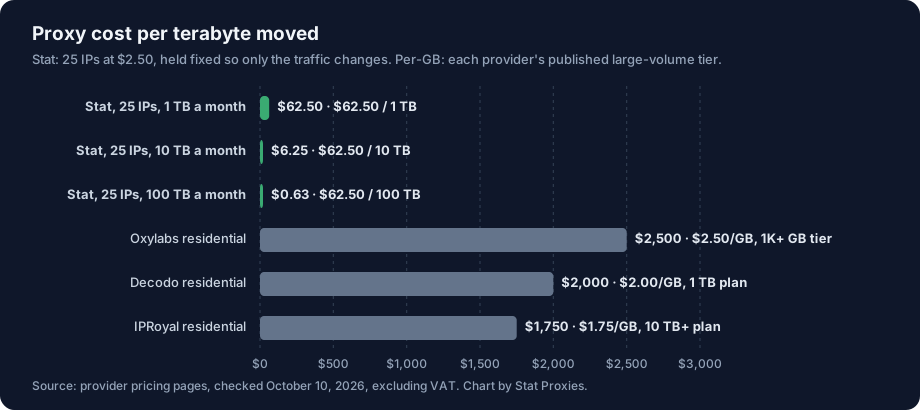
The three green bars are barely visible, and that's the finding. At 1 TB a month, 25 flat IPs cost $62.50 per TB. At 10 TB it's $6.25, and at 100 TB it's 63 cents. The cheapest per-GB rate we found, IPRoyal's $1.75, is $1,750 per TB at every one of those volumes.
Here are the monthly bills behind the chart, plus a second Stat line at 200 IPs for crawls that want each IP to carry less traffic.
| Plan and rate used | 1 TB a month | 10 TB a month | 100 TB a month |
|---|---|---|---|
| Stat, 25 IPs at $2.50, unlimited bandwidth | $62.50 | $62.50 | $62.50 |
| Stat, 200 IPs at $2.50, unlimited bandwidth | $500 | $500 | $500 |
| Oxylabs residential, $2.50/GB at the 1K+ GB tier | $2,500 | $25,000 | $250,000 |
| Decodo residential, $2.00/GB on the 1 TB enterprise plan, excl. VAT | $2,000 | $20,000 | $200,000 |
| IPRoyal residential, $1.75/GB subscription, from 10 TB | not published | $17,500 | $175,000 |
All rates checked October 10, 2026. Three notes so you read the table fairly:
- Above the largest published tier, prices are negotiated. Decodo's page tops out at 1 TB and IPRoyal's custom plan starts at 10 TB. The 10 TB and 100 TB cells are the list rate multiplied out. Treat them as a ceiling to negotiate down from.
- IPRoyal publishes nothing between 10 GB and 10 TB, so the 1 TB cell is blank. Its pay-as-you-go rate for the same 10 TB plan is $1.84/GB.
- We left two providers out. Webshare's residential page lists $1.40/GB at 3,000 GB as a promotion against a $7.00 regular rate, and Bright Data's residential tiers show a coupon price beside a struck list price. Neither gave us one clear list rate for a stated tier, so neither is in the chart.
The bandwidth clause decides whether "flat" stays flat
Some per-IP products are flat only up to a point. Bright Data's ISP proxy page, checked October 10, 2026, says each IP "includes a 100 GB fair usage allowance per month", which gives 25 IPs 2.5 TB a month before "additional charges may apply". A 100 TB month on that plan would need the allowance of 1,000 IPs. Read the bandwidth line before you compare per-IP prices. Stat's IPs have no fair-use cap.
Where per-GB pricing is cheaper
Per-GB wins at low volume, and the account minimum moves the line. Our breakeven post divided one IP's price by a per-GB rate. A buyer can't buy one IP from us, though. The smallest Stat order is 25 IPs, $62.50 a month, so the honest breakeven is for the whole order:
breakeven_GB_per_month = minimum_order_cost / per_GB_rate
                       = 62.50 / 4.00 = 15.6 GB   (Decodo pay as you go)
The chart puts Decodo's no-commitment $4.00/GB rate next to the flat minimum.
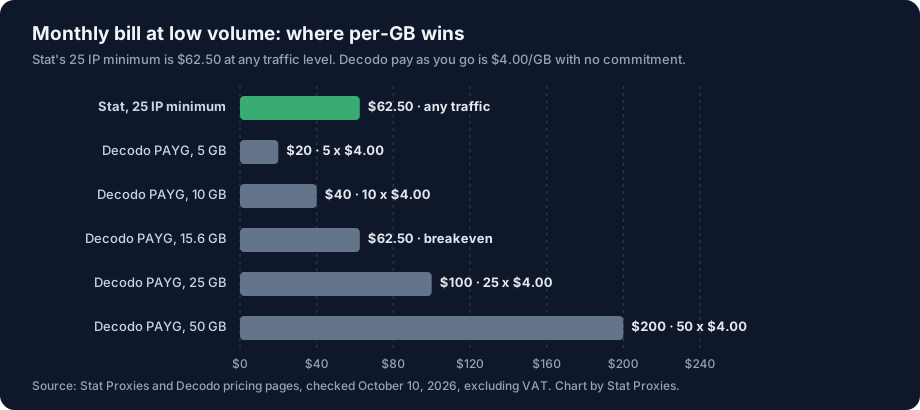
Below 15.6 GB a month, pay-as-you-go is cheaper: 5 GB costs $20 and 10 GB costs $40. Above it, the flat minimum wins, and the gap grows with every gigabyte. The same division against the other rates:
| Per-GB rate (checked October 10, 2026) | Monthly GB where it matches $62.50 |
|---|---|
| Decodo pay as you go, $4.00 | 15.6 GB |
| Oxylabs 1K+ GB tier, $2.50 | 25 GB |
| Decodo 1 TB plan, $2.00 | 31.3 GB |
| IPRoyal 10 TB+ subscription, $1.75 | 35.7 GB |
The bottom three rows are illustrative, because those rates only apply once you buy 1 TB or more. Nobody on a 1 TB plan is moving 25 GB a month. In practice, the low-volume comparison is pay-as-you-go against the flat minimum, and the line sits around 15 GB.
A 1 TB month moves about 33 GB a day, so it clears that line before its first day is over. At an assumed 100 KB of HTML per page (our assumption; measure your own pages), 15.6 GB is about 156,000 pages.
What 100 TB a month looks like on the wire
A terabyte figure is easier to plan once it's a rate. A 30-day month has 2,592,000 seconds, so:
| Monthly volume | Average sustained throughput | Pages per second at 100 KB a page (assumed) |
|---|---|---|
| 1 TB | 3.1 Mbps | 3.9 |
| 10 TB | 30.9 Mbps | 38.6 |
| 100 TB | 309 Mbps | 386 |
Two things follow. First, the bytes aren't the hard part: 309 Mbps averaged over a month is a modest load for a cloud fleet. Second, 386 pages a second is a lot of requests, and what limits a large crawl is how many requests each site will take from you. Spread over 25 IPs, 386 pages a second is about 15 per IP, across many different sites. We work through the concurrency side, with Little's law and a crawl planner, in Do Low-Latency Proxies Matter for AI Training Data Collection?, and the IP count side in how many proxies you need.
If you'd rather keep each IP lighter, buy more IPs. 200 IPs are $500 a month, which at 100 TB is $5 per TB.
Why Ashburn matters if your crawlers run in us-east-1
Location matters for a crawl because every request travels from your crawler to the proxy before it goes anywhere else. Keep that first leg short and inside one region.
AWS lists us-east-1 as "US East (N. Virginia)". Ashburn is in Loudoun County in Northern Virginia, the area known as Data Center Alley for its concentration of data centers. Stat's X1 Fiber IPs are in Ashburn. A crawler fleet in us-east-1 reaches them without leaving the region, and the only latency figure we publish for the network is 10–50 ms. Don't take ours on faith: the curl timing method in the low-latency post measures your own hop in a minute.
There's a second reason AI teams end up in Virginia. Common Crawl's archive is an S3 bucket in us-east-1, per the AWS Open Data registry. The usual pattern, covered in our Internet Archive vs Common Crawl vs archive.today comparison, is to pull what the archive already has and live-fetch only the gaps. With Ashburn proxies, both halves of that pipeline run from the same region.
Watch the NAT gateway line on your AWS bill
A large crawl can run up a cloud networking bill bigger than the proxy bill. If your crawl workers sit in private subnets, their traffic to the proxy goes through a NAT gateway, and AWS charges for "each gigabyte of data that it processes". The AWS VPC pricing page says this applies regardless of the traffic's source or destination, and its worked example for US East (Ohio) uses $0.045 per GB. At that rate, 100 TB through a NAT gateway is $4,500 a month, 72 times the 25 IP proxy bill. AWS states there is no charge for an internet gateway itself, so crawl workers in public subnets avoid the processing fee, though EC2 data transfer charges still apply. Check the rate for your region before you plan around it.
Crawl etiquette for large crawls
A large crawl stays welcome by being easy to identify and easy to slow down. A proxy changes the IP a site sees and nothing about what the site allows. These rules apply to your bot as a whole, however many IPs it uses.
Follow robots.txt the way RFC 9309 defines it
The Robots Exclusion Protocol is RFC 9309, published September 2022. The parts that matter at scale:
- Status codes have meanings. A 4xx on robots.txt means "unavailable", and the crawler may access the site. A 5xx means "unreachable", and the crawler must assume complete disallow.
- Cache it, but not forever. Crawlers should not use a cached copy for more than 24 hours, unless the file is unreachable.
- Parse at least 500 KiB. Some large sites have long files.
- Match your product token. Matching is case-insensitive, and your token should appear in the User-Agent you send.
- It isn't access control. The RFC says the rules "are not a form of access authorization." It's the site's published request, and a crawler that respects it keeps getting served.
Send a named user agent
Identify your crawler with a product token and a URL that explains the bot and how to opt out, such as ExampleDataBot/1.0 (+https://example.com/bot). Common Crawl does exactly this: CCBot identifies as CCBot/2.0 (https://commoncrawl.org/faq/). Site owners block anonymous traffic faster than a bot they can read about and write a rule for.
Spreading a named crawler across many IPs to get around a site that disallowed it is the move that gets a whole IP range blocked. If a site says no to your token, the answer is no from every IP.
Crawl-delay is non-standard, and the big crawlers disagree on it
Crawl-delay is not part of RFC 9309. The RFC only says crawlers "MAY interpret other records". The major crawlers treat it differently:
| Crawler | Crawl-delay | Source |
|---|---|---|
| Googlebot | Ignored. Google supports user-agent, allow, disallow and sitemap; "other fields such as crawl-delay aren't supported" |
Google Search Central robots.txt docs |
| Bingbot | Honored as a time window of 1 to 30 seconds, one page or none per window. 5 seconds caps Bingbot at about 17,280 pages a day | Bing Webmaster blog, May 2012 |
| CCBot (Common Crawl) | Obeyed. CCBot also backs off adaptively on 429 and 5xx responses | Common Crawl FAQ |
For your own crawler, follow CCBot's lead. If a site sets Crawl-delay, it's telling you the gap it wants between your requests, and honoring it costs you nothing on a broad crawl because you have other hosts to fetch from in the meantime. Treat the delay as per site, shared across all your IPs. If ten IPs each keep their own 5-second gap, the site gets two requests a second.
When a site answers 429 or 503, slow down. RFC 6585 defines 429 Too Many Requests and says the response may carry a Retry-After header saying how long to wait.
A polite fetcher in 59 lines of standard-library Python
This script does all of the above with nothing but the standard library: it fetches robots.txt through the proxy, applies RFC 9309's status code rules, re-checks robots.txt after 24 hours, honors Crawl-delay or Request-rate per host, and backs off a host on 429 or 503. Swap in your credentials and URLs.
import time
import urllib.error
import urllib.request
from urllib.parse import urlsplit
from urllib.robotparser import RobotFileParser

PROXY = "http://USERNAME:PASSWORD@proxy.statproxies.com:8080"
UA = "ExampleDataBot/1.0 (+https://example.com/bot)"  # a named bot with an info page
DEFAULT_DELAY = 1.0  # seconds between requests to one host if robots.txt sets none
ROBOTS_TTL = 24 * 3600  # RFC 9309: don't trust a cached robots.txt past 24 hours

opener = urllib.request.build_opener(urllib.request.ProxyHandler({"http": PROXY, "https": PROXY}))
opener.addheaders = [("User-Agent", UA)]
robots: dict[str, RobotFileParser] = {}
next_ok: dict[str, float] = {}  # host -> earliest next request, shared by all your IPs


def rules_for(url: str) -> RobotFileParser:
    p = urlsplit(url)
    rp = robots.get(p.netloc)
    if rp and time.time() - rp.mtime() < ROBOTS_TTL:
        return rp
    rp = RobotFileParser()
    try:
        with opener.open(f"{p.scheme}://{p.netloc}/robots.txt", timeout=30) as resp:
            rp.parse(resp.read(512_000).decode("utf-8", "replace").splitlines())  # 500 KiB
    except urllib.error.HTTPError as err:
        if err.code in (401, 403) or err.code >= 500:
            rp.disallow_all = True  # 5xx: RFC 9309 says full disallow; 401/403: our choice
        else:
            rp.allow_all = True  # 404 and other 4xx: no rules apply
    except OSError:
        rp.disallow_all = True  # no answer at all: stay out until the next check
    rp.modified()
    robots[p.netloc] = rp
    return rp


def polite_get(url: str) -> bytes | None:
    rp, host = rules_for(url), urlsplit(url).netloc
    if not rp.can_fetch(UA, url):
        return None
    rate = rp.request_rate(UA)
    delay = rp.crawl_delay(UA) or (rate.seconds / rate.requests if rate else DEFAULT_DELAY)
    time.sleep(max(0.0, next_ok.get(host, 0.0) - time.monotonic()))
    next_ok[host] = time.monotonic() + float(delay)
    try:
        with opener.open(url, timeout=30) as resp:
            return resp.read()
    except urllib.error.HTTPError as err:
        if err.code in (429, 503):  # slow down: honor Retry-After seconds, else wait 60
            wait = err.headers.get("Retry-After", "")
            next_ok[host] = time.monotonic() + (int(wait) if wait.isdigit() else 60)
        return None


for url in ["https://example.com/", "https://example.com/about"]:
    body = polite_get(url)
    print(url, "skipped" if body is None else f"{len(body):,} bytes")
We tested it on October 10, 2026, with Python 3.13 against a local server: a 2-second Crawl-delay spaced two requests 2.0 seconds apart, a disallowed path was skipped, a 429 with Retry-After: 3 held the next request to that host for 3 seconds, and a 503 on robots.txt blocked the whole host.
Three things to know before you scale it:
- It's sequential on purpose. For a real crawl, run many hosts in parallel and keep
next_okin shared storage, such as Redis, so every worker and every IP sees the same per-host clock. - robots.txt is per host.
www.example.comandexample.comeach have their own file, which is why the cache is keyed bynetloc. - 401 and 403 on robots.txt are our choice. RFC 9309 treats them like any other 4xx, which allows crawling. We disallow instead, because a site that refuses its robots.txt to you is unlikely to want the rest crawled. Python's own
RobotFileParser.read()makes the same choice.
Crawl frameworks have these switches built in. The Rust crawler Spider, for example, has with_respect_robots_txt and with_delay options alongside its proxy setting.
When Stat is the wrong pick
- You move less than about 15 GB a month. The 25 IP minimum is $62.50. Pay-as-you-go traffic at $4.00/GB is cheaper below that.
- You need content from outside the US. Every Stat IP is in the US, and we don't offer state or city targeting. Pages that vary by country need IPs in that country.
- Your targets block any IP they've seen before. Static IPs, ours included, are recognized on return visits. A rotating residential pool is the right tool there, even at per-GB prices.
- The site said no. If robots.txt disallows your crawler, or the terms prohibit automated collection, no proxy changes that. Read the terms and get legal advice on training data use; we can explain the network, not what your use permits.
If your crawl targets US sites, runs every day and moves terabytes, flat pricing wins by a wide margin. Static ISP proxies, including X1 Fiber IPs in Ashburn, start at $2.50 per IP per month with a 25 IP minimum, unlimited bandwidth and no concurrency limit, and IPs go live the moment you check out. The AI data use case page covers dataset refreshes and larger dedicated blocks.
FAQ
What does a terabyte of proxy traffic cost in 2026?
On per-GB residential plans checked October 10, 2026, a terabyte costs $1,750 at IPRoyal's $1.75/GB rate for 10 TB and up, $2,000 on Decodo's 1 TB plan and $2,500 at Oxylabs' 1K+ GB tier. On flat per-IP pricing the cost per terabyte falls as volume grows: 25 Stat IPs cost $62.50 a month, which is $62.50 per TB at 1 TB, $6.25 at 10 TB and 63 cents at 100 TB.
When are per-GB proxies cheaper than flat-rate proxies for crawling?
When your monthly volume is small. Divide the smallest flat order by the per-GB rate you'd pay. Stat's 25 IP minimum costs $62.50, and Decodo's pay-as-you-go rate is $4.00/GB, so per-GB is cheaper below about 15.6 GB a month. A crawl that moves terabytes passes that point within its first day, and the flat order costs the same no matter how much more it moves.
Do websites see fiber proxies differently from other ISP proxies?
No. Sites classify an IP by looking it up in IP-intelligence databases, which classify the network an IP belongs to. Fiber describes the access network, and it isn't a separate category in those lookups. MaxMind's connection type database, for example, has Cable/DSL, Cellular, Corporate and Satellite, with no fiber value. Stat's X1 Fiber IPs read as ISP, the same as our other ISP proxies.
Why does proxy location matter for crawlers running in AWS?
Every request goes from your crawler to the proxy first, so that leg adds to each round trip. AWS lists us-east-1 as US East (N. Virginia), and Stat's X1 Fiber IPs are in Ashburn, Northern Virginia, so crawlers in us-east-1 reach them without leaving the region. Common Crawl's S3 bucket is also in us-east-1. Watch NAT gateway charges, which AWS bills per gigabyte processed.
Do major crawlers honor Crawl-delay in robots.txt?
Some do. Crawl-delay isn't part of the robots.txt standard, RFC 9309. Google says it doesn't support the field. Bing honors it as a time window of 1 to 30 seconds with at most one page per window. Common Crawl's CCBot obeys it. Your own crawler should honor it per site, shared across every IP you use, because it's the site telling you how fast it wants to be crawled.
Sources
- Oxylabs residential pricing, $2.50/GB at the 1K+ GB tier: oxylabs.io/pricing/residential-proxy-pool, checked October 10, 2026.
- Decodo residential pricing, $4.00/GB pay as you go, $2.00/GB on the 1 TB enterprise plan, prices excluding VAT: decodo.com/proxies/residential-proxies, checked October 10, 2026.
- IPRoyal residential pricing, $1.75/GB subscription and $1.84/GB pay as you go on the custom plan from 10 TB: iproyal.com/residential-proxies, checked October 10, 2026.
- Bright Data ISP proxies, 100 GB fair usage allowance per IP per month: brightdata.com/pricing/proxy-network/isp-proxies, checked October 10, 2026.
- Webshare residential pricing (excluded, promotional rate): webshare.io/residential-proxy, checked October 10, 2026.
- MaxMind connection type values: GeoIP2 Connection Type database docs, checked October 10, 2026.
- us-east-1 is US East (N. Virginia): AWS Regions documentation and AWS global infrastructure, checked October 10, 2026.
- Ashburn, Loudoun County and Data Center Alley: Wikipedia, Ashburn, Virginia, checked October 10, 2026.
- Common Crawl bucket region (us-east-1): Registry of Open Data on AWS, checked October 10, 2026.
- NAT gateway per-GB processing and the US East (Ohio) example: Amazon VPC pricing and NAT gateway pricing docs; no charge for an internet gateway: internet gateway docs, checked October 10, 2026.
- Robots Exclusion Protocol: RFC 9309, September 2022.
- 429 Too Many Requests and Retry-After: RFC 6585, section 4, April 2012.
- Google and crawl-delay: Google Search Central, robots.txt spec, checked October 10, 2026, and A note on unsupported rules in robots.txt, July 2019.
- Bingbot and crawl-delay: To crawl or not to crawl, that is BingBot's question, Bing Webmaster blog, May 3, 2012.
- CCBot user agent, Crawl-delay and backoff: Common Crawl FAQ, checked October 10, 2026.
- Python
urllib.robotparser(crawl_delay,request_rate,mtime): Python docs, checked October 10, 2026; script tested with Python 3.13. - Spider crawler options: docs.rs, spider::website::Website, checked October 10, 2026.
- Stat Proxies prices: pricing, October 2026.