Do Low-Latency Proxies Matter for AI Training Data Collection?
By Nicholas St. Germain. Published
Low latency matters less for AI training data collection than most proxy buyers expect. A proxy's latency is paid once per network round trip, so on a reused connection a 10 to 50 ms hop adds 10 to 50 ms to a page that already takes hundreds of milliseconds, or several seconds if you render it. What sets the speed and cost of a training crawl is throughput: how many connections you hold open, how many bytes you move, and how you pay for those bytes. For terabyte-scale crawls of US sites, flat-priced static ISP proxies with unlimited bandwidth, such as Stat's at $2.50 per IP per month, usually cost a small fraction of per-GB residential plans.
Latency does matter in one common case, and it's the case most training crawls are in: broad crawls that touch millions of different sites and rarely reuse a connection. This post shows how to tell which case you're in, with the math, two charts, a calculator, and a crawler you can run.
Our bias, up front
We sell static US ISP proxies: $2.50 per IP per month, unlimited bandwidth, 10–50 ms latency, over HTTP, HTTPS or SOCKS5. We don't sell per-GB residential traffic, and we don't sell IPs outside the US. Every number below is either computed in the open or linked to the page it came from, so you can check it against whatever you're quoted.
The short answer by job
Training data jobs differ more than the phrase "AI data collection" suggests. This table is the decision in one place.
| Collection job | What limits you | Does proxy latency matter? | Proxy that fits |
|---|---|---|---|
| Broad crawl of public US web pages (HTML only) | Connections, bytes, politeness per site | Yes, on cold connections. Each new site pays the hop about 4 times | Static ISP, flat-rate, many IPs |
| Deep crawl of a few large US sites | Each site's per-IP rate limit | Barely. Connections stay warm | Static ISP, sized to rate limits |
| JSON APIs and sitemaps | Requests per second | Somewhat. Small responses make the hop a bigger share | Static ISP or fiber |
| JavaScript-heavy pages that need a browser | Render time and browser memory | No. Rendering takes seconds | Static ISP, one IP per browser context |
| Non-US content | Geography | n/a | Not Stat. Use a provider with IPs in that country |
| Targets that block any repeated IP | IP reputation per request | n/a | Not Stat. This needs rotation across a large pool |
The rest of the post is the reasoning behind the third column.
Where proxy latency actually shows up
A proxy adds one leg to every network round trip: your crawler talks to the proxy, and the proxy talks to the site. Call the extra time on that leg the hop. The hop is paid per round trip, so the number that matters is how many round trips a page costs.
A brand-new HTTPS request through an HTTP proxy costs about four round trips that each pay the hop:
- TCP handshake with the proxy. Your crawler opens a connection to the proxy.
- CONNECT. The crawler asks the proxy for a tunnel. The proxy dials the site and answers "200 Connection established".
- TLS handshake. With TLS 1.3 this is one round trip, end to end through the tunnel. TLS 1.2 takes two.
- The request itself. GET out, response back.
On a connection that's already open (HTTP keep-alive, or HTTP/2 multiplexing several requests over one connection), only step 4 happens. The hop is paid once.
SOCKS5 with a username and password costs a little more on a cold start, since the greeting, the authentication and the connect request are separate exchanges. Once the tunnel is up, it costs the same as HTTP.
So the time for one page is roughly:
seconds_per_page = server_time + transfer_time + round_trips x hop
With a warm connection, round_trips is 1. With a cold one, it's about 4. That single number explains most of the latency debate.
Measure your own hop
Don't take our 10–50 ms on faith. curl breaks a request into phases. Run it once through the proxy and once direct:
curl -s -o /dev/null \
  -x http://USERNAME:PASSWORD@proxy.statproxies.com:8080 \
  -w 'proxy connect %{time_connect}s | tunnel+tls %{time_appconnect}s | first byte %{time_starttransfer}s | total %{time_total}s\n' \
  https://example.com/
Through a proxy, time_connect is the TCP handshake with the proxy, and time_appconnect covers the CONNECT plus the TLS handshake with the site. Subtract the direct run's numbers from the proxied run's and you have your hop cost, cold. Our curl proxy testing guide covers the other flags.
Little's law turns latency into connections
Latency doesn't cap a crawler's throughput. Concurrency does, and latency sets how much concurrency you need. The tool for this is Little's law, proved by John Little in 1961:
open_connections = pages_per_second x seconds_per_page
If you want 100 pages a second and each page takes 0.3 seconds, you need 30 requests in flight at any moment. A slower hop doesn't lower your page rate. It raises the number of connections you have to keep open to hold that rate.
Here is that arithmetic for four setups at 100 pages a second. The timings are illustrative, picked to be typical. The crawl planner further down takes your own.
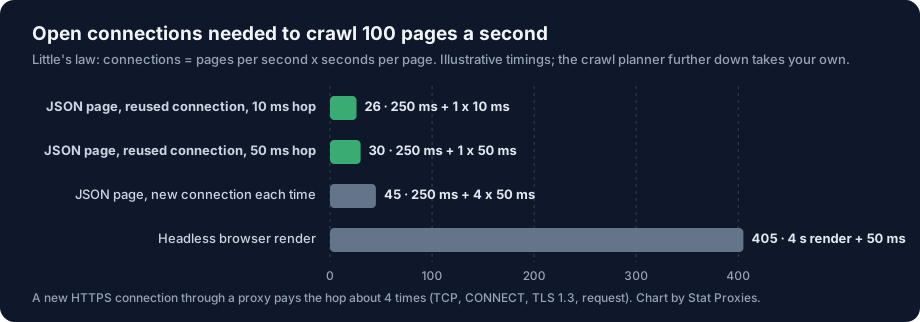
Read the bars from the top:
- Changing the hop from 10 ms to 50 ms moves you from 26 to 30 connections. That's the entire difference between a fast proxy and a slow one, on warm connections: four more sockets.
- Opening a new connection for every page at 50 ms moves you to 45. Reusing connections saves 15 sockets; the faster proxy saved 4.
- Rendering every page in a headless browser moves you to 405. Rendering is the expensive choice by an order of magnitude, and it has nothing to do with the proxy.
Connections are cheap. A single crawler process can hold thousands of idle sockets, and Stat sets no concurrency limit. What a connection costs you is politeness: every open connection is load on someone's server. That's why the crawl planner asks how many connections you allow per IP, and why IP count, not latency, is the real sizing question.
When latency does matter: broad crawls
The warm-connection numbers assume you fetch many pages from the same site, so the connection stays open. A broad crawl, the kind that builds a general training corpus, does the opposite. It visits millions of sites and pulls a few pages from each. Most requests start cold.
In that case, every page pays the hop about four times. At a 50 ms hop that's 200 ms of handshakes per page; at 10 ms it's 40 ms. On a 250 ms page, that's the difference between 450 ms and 290 ms, or 55% more open connections for the same page rate. In the crawl planner below, pick "New HTTPS connection per page" and watch the "time on the proxy leg" bar grow.
Two fixes beat shopping for a faster proxy:
- Batch by host. Queue URLs so each site's pages are fetched together while its connection is warm, then move on. Most crawl frontiers can do this.
- Put your workers near the proxy. The hop includes the leg from your crawler to the proxy. Stat's network is on the US East Coast; crawler workers in a US East cloud region keep that leg short.
Throughput is the real bottleneck
Latency decides how many sockets you hold. Bytes decide your bill. A training crawl is a bandwidth job, and this is where proxy pricing models differ by a factor of 28 or more.
Start with page weight. The HTTP Archive's July 2026 crawl puts the median desktop page at about 2.94 MB with every image, script and font. A text-focused training crawl that fetches only the HTML moves far less. We use 0.1 MB per page as a working assumption for HTML-only fetches; measure your own on a sample before you budget.
At 0.1 MB per page, 2 million pages a day comes to about 6 TB a month. A crawl that renders pages and lets images load can move thirty times that. Per-GB residential pricing charges for every one of those bytes.
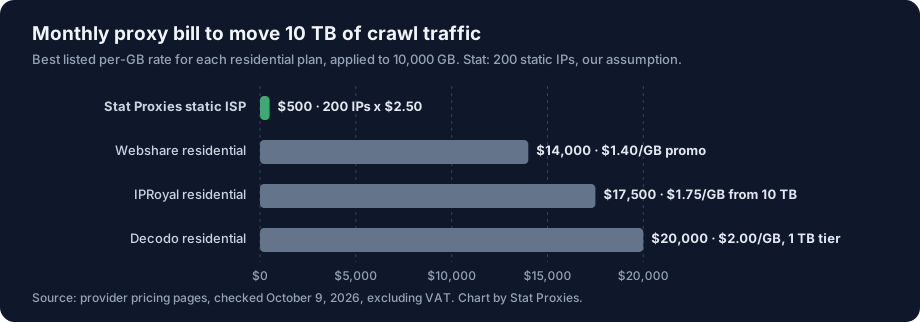
Here's what 10 TB a month costs at the best listed per-GB rate on three residential plans, against a flat-rate setup. Prices were checked on the providers' pages on October 9, 2026.
| Plan | Rate used | 10 TB per month |
|---|---|---|
| Stat Proxies static ISP, 200 IPs | $2.50 per IP, unlimited bandwidth | $500 |
| Webshare residential | $1.40/GB, 3,000 GB tier promo (regular $7.00) | $14,000 |
| IPRoyal residential | $1.75/GB subscription, from 10 TB | $17,500 |
| Decodo residential | $2.00/GB, 1 TB enterprise tier, excl. VAT | $20,000 |
Two caveats. First, the 200 IPs are our assumption; your count comes from your concurrency and how hard you're willing to press each site, which the planner under this chart works out. Second, per-GB pools rotate through millions of addresses, and that's worth paying for on some targets (see the last section). For a crawl of US sites that tolerate a steady, polite crawler, you're paying for rotation you don't need.
The general version of this math, with the breakeven formula and eleven plans, is in Flat-Rate vs Per-GB Proxies: The Breakeven Math. The short form: an IP that moves more than about 2 GB a month is cheaper on a flat plan against every per-GB rate we've found. A training-crawl IP moves tens of gigabytes.
A crawler that spends the hop well
This async crawler does the three things this post argues for: it reuses connections (HTTP/2 through the tunnel, with a large keep-alive pool), it caps connections per site, and it obeys robots.txt. It also measures time per page, so you can plug your real number into Little's law.
import asyncio, time
from urllib.parse import urlsplit
from urllib.robotparser import RobotFileParser

import httpx  # pip install "httpx[http2]"

PROXY = "http://USERNAME:PASSWORD@proxy.statproxies.com:8080"
UA = "ExampleTrainingBot/1.0 (+https://example.com/bot)"
PER_SITE = 2  # open connections per site: a politeness setting

robots: dict[str, RobotFileParser] = {}
site_slots: dict[str, asyncio.Semaphore] = {}
timings: list[float] = []

async def allowed(client: httpx.AsyncClient, url: str) -> bool:
    host = urlsplit(url).netloc
    if host not in robots:
        rp = RobotFileParser()
        try:
            r = await client.get(f"https://{host}/robots.txt")
            if r.status_code >= 500:
                rp.disallow_all = True  # RFC 9309: server error means stay out
            else:
                rp.parse(r.text.splitlines() if r.status_code == 200 else [])
        except httpx.HTTPError:
            rp.disallow_all = True
        robots[host] = rp
    return robots[host].can_fetch(UA, url)

async def fetch(client: httpx.AsyncClient, url: str) -> httpx.Response | None:
    slot = site_slots.setdefault(urlsplit(url).netloc, asyncio.Semaphore(PER_SITE))
    async with slot:
        if not await allowed(client, url):
            return None
        start = time.perf_counter()
        response = await client.get(url)
        timings.append(time.perf_counter() - start)
        return response

async def crawl(urls: list[str], target_pages_per_sec: float) -> None:
    limits = httpx.Limits(max_connections=500, max_keepalive_connections=500, keepalive_expiry=60)
    async with httpx.AsyncClient(proxy=PROXY, http2=True, limits=limits, timeout=30,
                                 headers={"User-Agent": UA}) as client:
        await asyncio.gather(*(fetch(client, u) for u in urls), return_exceptions=True)
    if timings:
        timings.sort()
        mean = sum(timings) / len(timings)
        print(f"{len(timings)} pages, p50 {timings[len(timings) // 2] * 1000:.0f} ms, "
              f"p95 {timings[int(len(timings) * 0.95)] * 1000:.0f} ms")
        print(f"Little's law: {target_pages_per_sec * mean:.0f} connections "
              f"for {target_pages_per_sec} pages/s")

# Sort URLs by host before calling crawl() so each site's connection stays warm.
asyncio.run(crawl(["https://example.com/", "https://example.org/"], target_pages_per_sec=100))
For production, swap the list for a queue, add retries with backoff on 429 and 503, and spread the load over several proxy IPs by running one client per IP. Crawl frameworks handle much of this for you; we've written up Crawl4AI and the Rust crawler Spider, both of which take a proxy setting.
Collect what you're allowed to collect
A proxy changes the IP a site sees. It doesn't change what you're permitted to take, and a training crawl is the kind of traffic site owners now look for by name.
- Obey robots.txt. The Robots Exclusion Protocol is a standard, RFC 9309, and the crawler above follows its rule that a server error on robots.txt means don't crawl. Many sites now write rules for AI crawlers specifically, naming user agents such as GPTBot, Google-Extended and CCBot. If a site disallows AI training crawlers, routing around that through proxies is the wrong move.
- Identify your crawler. Use a user agent with a name and a URL that explains the bot and how to opt out. Site owners block anonymous crawlers faster than named ones.
- Keep per-site load low. Two connections per site, as in the code, is a sensible start. Back off on 429 and 503 responses.
- Read the terms and get legal advice. Copyright and terms of service questions around training data are unsettled in several jurisdictions. We can tell you how the network works; we can't tell you what your use permits.
When Stat is the wrong pick
- You need content from outside the US. Every Stat IP is in the US. Pages that vary by country need IPs in that country.
- Your targets block any address they've seen before. Some sites score each IP and challenge repeat visitors. Static IPs, ours included, get recognized there, and a rotating residential pool with millions of addresses is the right tool even at per-GB prices.
- Your volume is small. Below about 2 GB per IP per month, per-GB is cheaper. A one-off crawl of a few gigabytes doesn't need a monthly plan.
- You need a specific city or state. We don't offer state or city targeting.
If your crawl is US sites, moves real bandwidth and runs every day, the flat model wins by a wide margin. Static ISP proxies start at $2.50 per IP per month with a 25 IP minimum, unlimited bandwidth and no concurrency limit, and they go live the moment you check out. The AI data use case page covers setups for dataset refreshes and agent workloads.
FAQ
Does proxy latency slow down web crawling?
Only a little on reused connections, and more on new ones. A proxy adds its latency to each network round trip. A page fetched over an open connection pays it once, so a 10 to 50 ms hop adds 10 to 50 ms. A page on a new HTTPS connection pays it about four times, which matters for broad crawls that visit many sites once. Latency doesn't cap throughput; it raises the number of connections needed to hold a given page rate.
How many proxies do I need for an AI training data crawl?
Work it out from Little's law. Multiply pages per second by seconds per page to get open connections, then divide by the connections you allow per IP. At 2 million pages a day, 0.63 seconds per page and 2 connections per IP, that's 15 connections and 8 IPs. Stat's minimum is 25 IPs. Each site's own rate limit is the other constraint; our proxy sizing guide covers it.
Are residential or ISP proxies better for AI training data?
For US sites that accept a polite, steady crawler, static ISP proxies are usually better because they're billed per IP with unlimited bandwidth, and training crawls move terabytes. Rotating residential proxies are better for sites that block repeat visitors and for non-US content, but per-GB pricing makes them expensive at volume. At October 2026 rates, 10 TB costs $14,000 to $20,000 per month on the residential plans we checked.
How much does it cost to collect 10 TB of web data through proxies?
On per-GB residential plans checked October 9, 2026, 10 TB costs $14,000 at Webshare's $1.40 promo rate, $17,500 at IPRoyal's $1.75 rate and $20,000 at Decodo's $2.00 rate. On flat-rate static ISP proxies the cost depends on IP count, not bytes; 200 Stat IPs cost $500 a month whether they move 1 TB or 10 TB.
Do proxies let a crawler ignore robots.txt?
No. A proxy changes the IP address a site sees and nothing about what the site allows. robots.txt is a published standard (RFC 9309), and many sites now set rules for AI crawlers by user agent. A training crawler should fetch robots.txt for every site, follow it, identify itself with a named user agent, and keep per-site load low.
Sources
- Little's law: Wikipedia, from J. D. C. Little, "A Proof for the Queuing Formula L = λW", Operations Research, 1961.
- Robots Exclusion Protocol: RFC 9309, September 2022.
- Page weight: HTTP Archive page weight report, July 2026 crawl.
- Per-GB prices: Webshare, IPRoyal and Decodo pricing pages, checked October 9, 2026.
- Stat Proxies prices: pricing, October 2026.