What Proxies Are Best for Real-Time Ecommerce Price Scraping?
By Nicholas St. Germain. Published
Static ISP proxies are the best fit for real-time price scraping of US retail sites. Size the pool so each IP stays under the request rate the target tolerates at your refresh interval: IPs = SKUs × checks per hour ÷ requests per IP per hour. Stat's static ISP proxies cost $2.50 per IP per month with unlimited bandwidth, so heavy product pages don't move the bill. They're the wrong fit for non-US marketplaces and for sites that block any IP they've seen before.
This post works that formula through at refresh intervals from one hour down to 60 seconds, shows which inputs actually move the IP count, and covers the two techniques that make frequent checks cheaper: conditional requests with ETag and Last-Modified, and hashing only the price fields so page noise doesn't trigger false alerts. There's a sizing calculator under the first chart and a 57-line Python checker that does both.
Our bias, up front
We sell static US ISP proxies: $2.50 per IP per month, a 25 IP minimum, unlimited bandwidth, 10–50 ms latency, over HTTP, HTTPS and SOCKS5 with the same login. We don't sell rotating pools, per-GB plans or IPs outside the US. One number in this post is an assumption we can't source: the requests per IP per hour a site will accept. No retailer publishes it, so we use 600 per hour (one request every 6 seconds) as an illustrative starting point and show you how to measure your own. Every other number is computed in the open or linked to where it came from.
The short answer by setup
Real-time price checks ask three things of a proxy setup: enough IPs to spread the request rate, a bill that doesn't grow with page weight, and the same vantage point every time so a price change means the price changed. This table compares the common setups on those three.
| Setup | Spreads a high request rate? | Cost when pages are heavy | Same vantage point each check? | Fits |
|---|---|---|---|---|
| Static ISP, sized to your rate (Stat) | Yes, add IPs as the schedule tightens | Flat per IP, unlimited bandwidth | Yes, each IP is yours | US retail sites that tolerate a steady, polite checker |
| Rotating residential, per GB | Yes, large pools | Grows with every byte and every retry | No, the exit IP changes | Sites that block repeat visitors, non-US marketplaces |
| Datacenter | Yes | Usually flat | Yes | Sites that don't score the IP's network type |
| Scraping API, billed per request | Yes, handled for you | Per request, often more for rendered pages | Varies by provider | Small catalogs, or teams that don't want to run scrapers |
| Your own server IP, no proxy | No, one address | Free | Yes | Your own store, or a target with an official feed |
The rest of this post is about the first column: how many IPs a given schedule needs.
How many IPs does real-time price scraping need?
Start with the formula:
requests_per_hour = SKUs x checks_per_hour / prices_per_request
IPs               = requests_per_hour / requests_per_IP_per_hour
Two of the inputs are yours to choose: how often you check each SKU, and how many prices one request returns. One is the site's: how many requests per hour it will accept from one IP before it slows you down. The SKU count is usually fixed by the business.
Here's the formula for one site with 10,000 SKUs, at the illustrative rate of 600 requests per IP per hour.
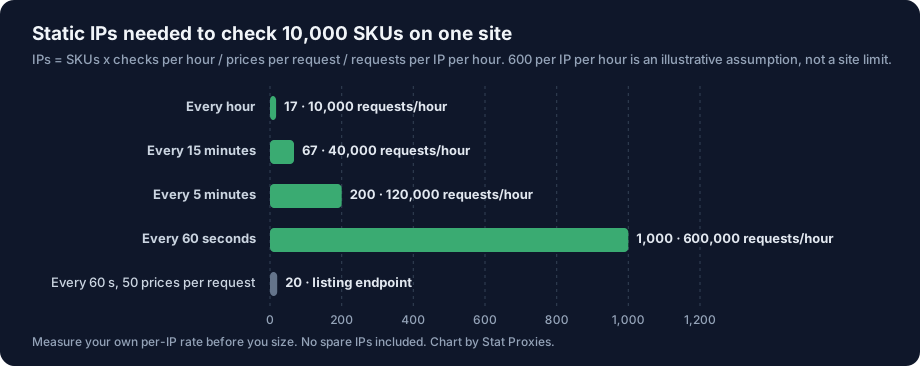
The green bars fetch one product per request. Each step down in refresh interval multiplies the request rate, and the IP count follows it in a straight line: 17 IPs for hourly checks, 67 for every 15 minutes, 200 for every 5 minutes and 1,000 for every 60 seconds. The gray bar checks the same 10,000 SKUs every 60 seconds through an endpoint that returns 50 prices per request, and needs 20 IPs.
The same numbers with 30% spare IPs added, and the monthly bill at $2.50 per IP:
| Refresh interval | Requests per hour | IPs (no spares) | IPs with 30% spare | Monthly cost |
|---|---|---|---|---|
| Every hour | 10,000 | 17 | 22, so the 25 IP minimum | $62.50 |
| Every 15 minutes | 40,000 | 67 | 87 | $217.50 |
| Every 5 minutes | 120,000 | 200 | 260 | $650 |
| Every 60 seconds | 600,000 | 1,000 | 1,300 | $3,250 |
| Every 60 seconds, 50 prices per request | 12,000 | 20 | 26 | $65 |
Read the last two rows together. Moving from product pages to an endpoint that returns 50 prices cuts the pool by a factor of 50. No proxy choice comes close to that.
Size each site on its own
Rate limits are per site. An IP that sends one request every 6 seconds to one retailer can send one every 6 seconds to a second retailer at the same time, and neither sees the other. So you size each target separately and the pool only has to cover the busiest one, as long as you schedule per site. A 10,000-SKU site and a 4,000-SKU site at 15 minutes need 67 IPs between them, not 67 + 27.
The calculator below takes your own numbers. Treat the default rate as a placeholder until you've measured it.
Where requests per IP per hour comes from
No retailer publishes the rate it accepts from one IP, and the ones that enforce a limit don't all count the same way. RFC 6585, which defines 429 Too Many Requests, says outright that it "does not define how the origin server identifies the user". MDN notes that limits are typically keyed on the client's IP but can be keyed on a user or a cookie. That matters for sizing: if a site counts requests per session cookie, adding IPs while sharing one cookie jar does nothing.
So measure it, per site, before you buy for it:
- Start one IP slow. One request every 30 seconds to product pages you'd check anyway.
- Step the rate up every hour or so, and log the status code, response size and whether the price parsed.
- Stop at the first sign of pushback. A 429, a 403, a challenge page, a response much smaller than usual, or a page that loads without the price. A 429 can carry a Retry-After header in seconds or as a date; honor it.
- Back off to well under that rate, then use that number in the formula. The headroom setting in the calculator covers retries and an IP you have to replace.
Two habits keep the measured rate valid as you scale. Spread requests evenly across the hour instead of firing each batch at the top of the interval, so each IP's rate is steady. And keep one IP per worker with its connections reused, so each IP looks like one steady client rather than a new one every request.
Is a 60-second refresh really real time?
On average, a price change waits half your refresh interval before you see it, and in the worst case the full interval. Checking every 15 minutes means an average delay of 7.5 minutes; checking every 60 seconds means 30 seconds. Going from 15 minutes to 60 seconds cuts the average delay by 7 minutes and costs 15 times the requests.
Two things cap how real time you can get, whatever the schedule:
- The site's cache. If a product response carries
Cache-Control: max-age=300and anAgeheader, a shared cache in front of the site can keep serving the same stored copy until it's 300 seconds old. RFC 9111 defines max-age as the point after which a response "is to be considered stale". Checking that URL every 60 seconds may read the same copy five times. Look at those two headers before you tighten a schedule. - When the price actually changes. A retailer may only reprice at certain times of day. Your own change log will show you when, after a week of checks.
The cheaper answer is to tier the catalog. Check the SKUs that move fastest or matter most every 60 seconds, the next tier every 15 minutes and the long tail hourly:
| Tier | SKUs | Interval | Requests per hour |
|---|---|---|---|
| Hot: top sellers, promo items | 500 | 60 seconds | 30,000 |
| Warm | 2,000 | 15 minutes | 8,000 |
| Long tail | 7,500 | 1 hour | 7,500 |
| Total | 10,000 | 45,500 |
That's 76 IPs at the illustrative rate, 99 with 30% spare, or $247.50 a month. Checking all 10,000 every 60 seconds would need 1,000 IPs before spares. The price monitoring use case covers how to pick the tiers.
Fetch less per check: JSON endpoints and listing pages
The prices-per-request input is the biggest lever in the formula, and you control it by choosing what you fetch.
- Product JSON. Many storefronts load product data from a JSON endpoint the page itself calls. Shopify documents one for its storefronts:
/products/{handle}.jsreturns "the JSON of the product", with variants and prices. Open your browser's developer tools on a product page, filter the network tab by Fetch/XHR, and look for the response that holds the price. - JSON embedded in the HTML. Many Next.js sites ship the page's data in a
__NEXT_DATA__script tag, and many product pages carry schema.org Product markup with an Offer holdingprice,priceCurrencyandavailability. Parsing either is steadier than CSS selectors. Our Walmart scraping guide parses__NEXT_DATA__step by step. - Listing, category and search endpoints. One response can carry dozens of prices. If the listing price is the one you need, this is where the 50x in the chart comes from. Check that it matches the product page; some sites show a different price after a variant or ZIP code is chosen.
A rendered page is the most expensive way to read a price. A headless browser downloads every script and image and takes seconds per page. Use one only for the prices that never appear in the HTML or a JSON response.
Before you build on any endpoint, read the site's terms of service. Many retailers restrict automated access, and an undocumented endpoint can change without notice. If the retailer offers an official product feed or partner API, use it.
Skip unchanged pages with ETag and Last-Modified
HTTP has a built-in way to ask "has this changed since I last saw it?", and when the server supports it, an unchanged check costs a few hundred bytes instead of the whole page. It's defined in RFC 9110 and documented on MDN.
It works with two pairs of headers:
| The server sends | You send back next time | If nothing changed |
|---|---|---|
ETag: "33a64df5" |
If-None-Match: "33a64df5" |
304 Not Modified, no body |
Last-Modified: Wed, 21 Oct 2026 07:28:00 GMT |
If-Modified-Since: Wed, 21 Oct 2026 07:28:00 GMT |
304 Not Modified, no body |
The rules that matter for a price checker, from RFC 9110:
- ETag wins. A server must ignore If-Modified-Since when the request also has If-None-Match. Send the ETag when you have one and fall back to the date when you don't.
- If-None-Match uses weak comparison.
W/"1"matches"1". A weak ETag (theW/prefix) tells you the server considers the content equivalent, not byte for byte identical. - A 304 has no body. It must still carry the headers a 200 would have had, including ETag, Date, Cache-Control and Vary.
- Only GET and HEAD get a 304. On other methods a failed condition is a 412.
- Last-Modified has one-second resolution. It's an HTTP date, so two changes inside the same second look like one.
We measured one on October 10, 2026: a conditional GET for a public file served through a CDN came back 304 with a 549-byte header block over HTTP/1.1 and no body, where the 200 had carried 2,919 bytes of content. HTTP/2 compresses headers, so the same 304 is smaller there.
What conditional requests save, and what they don't
Conditional requests cut bytes. A 304 is still a request, and you should assume it counts against the site's per-IP rate like any other, so the IP count from the first chart stays where it was.
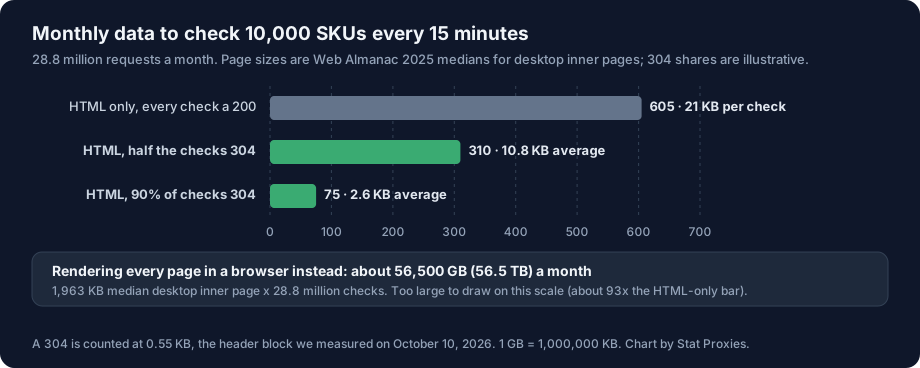
The chart uses the 15-minute schedule from earlier: 10,000 SKUs, 40,000 requests an hour, 28.8 million a month. Fetching the HTML only, at the 2025 Web Almanac's median of 21 KB of HTML for a desktop inner page, moves about 605 GB a month. If half the checks come back 304, that drops to 310 GB; if 90% do, to 75 GB. The 304 shares are illustrative, since they depend on how often your prices change and whether the site sends validators at all. Rendering every page in a browser instead, at the median desktop inner page weight of 1,963 KB, would move about 56.5 TB.
| Fetch method, 10,000 SKUs every 15 minutes | KB per check | GB per month |
|---|---|---|
| HTML only, every check a 200 | 21 | 605 |
| HTML, half the checks 304 | 10.8 | 310 |
| HTML, 90% of checks 304 | 2.6 | 75 |
| Rendered page with every asset | 1,963 | 56,534 |
On a flat per-IP plan, none of those rows changes the bill. On a per-GB plan, every row is a different bill, and retries and challenge pages bill the same as real data. Multiply the GB column by your per-GB rate to see the gap; our flat-rate vs per-GB breakeven math has the formula. Treat 21 KB as a floor: the same Almanac chapter puts the median HTML response at 33 KB, and a large retail product page can carry far more. Measure yours.
Why many product pages never return a 304
A dynamic product page may send no ETag or Last-Modified at all, or an ETag that changes on every response. The usual cause is per-response content in the HTML: a CSP nonce (MDN says to generate a different one on each page load), a CSRF token, a timestamp, a recommendations widget. A page like that never matches, so every check is a full 200. A JSON endpoint has no nonce or widgets in it, so it has a better chance of a stable validator than the HTML. Send the conditional headers anyway; they cost nothing when the server ignores them.
Hash only the price fields
For pages that never return 304, detect changes yourself. Hashing the whole HTML doesn't work for the same reason the ETag doesn't: the nonce and the widgets change every time, so every check looks like a change.
Hash only the fields you care about. Extract the price, the currency and the availability, serialize them in a fixed order, hash that, and compare it with the last hash for the URL. A new hash means the price or stock changed; the same hash means move on without writing a row or sending an alert. Hash-and-diff cuts the writes and alerts downstream. The bytes and requests stay the same: only a 304 saves bytes, and only the schedule saves requests.
A price checker that does both
This script checks a list of product URLs through one proxy IP. It sends If-None-Match or If-Modified-Since when it has a validator from the last run, reads the schema.org Offer fields from the page's JSON-LD, hashes only those fields, and reports each URL as a baseline, unchanged (304 or same hash) or changed. State is kept in a JSON file between runs. We tested it on October 10, 2026, against a local server, including a page whose nonce changed while its price didn't (reported unchanged) and one whose price changed (reported changed), and against a public CDN file that returned a 304.
# pip install httpx
# python price_check.py urls.txt   (one product URL per line)
import hashlib, json, re, sys, time
from pathlib import Path

import httpx

PROXY = "http://USERNAME:PASSWORD@proxy.statproxies.com:8080"
PACE = 6.0  # seconds between requests on this IP: your measured number, not a constant
STATE = Path("price_state.json")
LD_JSON = re.compile(r"<script[^>]*application/ld\+json[^>]*>(.*?)</script>", re.S | re.I)

def offers(html: str) -> list[dict]:
    """Price fields from schema.org Product markup. The rest of the page is ignored."""
    found = []
    for block in LD_JSON.findall(html):
        try:
            data = json.loads(block)
        except json.JSONDecodeError:
            continue
        items = data if isinstance(data, list) else data.get("@graph", [data])
        for item in items:
            if isinstance(item, dict) and item.get("@type") == "Product":
                raw = item.get("offers") or []
                for o in raw if isinstance(raw, list) else [raw]:
                    found.append({k: o.get(k) for k in ("price", "priceCurrency", "availability")})
    return found

def check(client: httpx.Client, url: str, seen: dict) -> str:
    prev = seen.get(url, {})
    headers = {}
    if prev.get("etag"):
        headers["If-None-Match"] = prev["etag"]
    elif prev.get("modified"):
        headers["If-Modified-Since"] = prev["modified"]
    r = client.get(url, headers=headers)
    if r.status_code == 304:
        return "unchanged (304, no body)"
    if r.status_code != 200:
        return f"HTTP {r.status_code}: back off, honor Retry-After"
    fields = offers(r.text)
    digest = hashlib.sha256(json.dumps(fields, sort_keys=True).encode()).hexdigest()
    seen[url] = {"etag": r.headers.get("etag"), "modified": r.headers.get("last-modified"), "hash": digest}
    if not fields:
        return "200 but no Product offer found: fix the parser"
    if "hash" not in prev:
        return f"baseline {fields}"
    return "unchanged (same hash)" if digest == prev["hash"] else f"CHANGED {fields}"

seen = json.loads(STATE.read_text()) if STATE.exists() else {}
urls = Path(sys.argv[1]).read_text().split()
with httpx.Client(proxy=PROXY, timeout=20, follow_redirects=True,
                  headers={"User-Agent": "ExamplePriceBot/1.0 (+https://example.com/bot)"}) as client:
    for url in urls:
        print(url, check(client, url, seen))
        time.sleep(PACE)
STATE.write_text(json.dumps(seen, indent=1))
To scale it, run one copy per proxy IP, give each copy its share of the URLs for a site, and set PACE from the rate you measured. Pages that keep their price outside JSON-LD need their own parser in offers(); the hashing doesn't change. A 304 keeps the old hash, which is correct, because the server just told you the page is the same.
When Stat is the wrong pick
- The marketplace is outside the US. Every Stat IP is in the US. Amazon.de or a UK grocer prices for its own country, and you need IPs there.
- Prices vary by US city or ZIP code and the site sets the region from the IP. We don't offer state or city targeting. Many retailers set the region from a store or ZIP selection instead, which our Walmart guide shows, so check how your target does it first.
- The target blocks any IP it has seen before. Some sites challenge every repeat visitor. Static IPs, ours included, get recognized there, and a large rotating pool is the right tool even at per-GB prices. Our Amazon scraping guide walks through when a hybrid makes sense.
- Your catalog is small and checks are rare. 500 SKUs checked twice a day is about 42 requests an hour. One IP covers that, and the 25 IP minimum would be idle.
- There's an official feed. If the retailer or marketplace offers a product or pricing API you're allowed to use, it beats any scraper.
If you check US retail prices on a schedule and the pages are heavy, the flat model is the one to price first. Static ISP proxies start at $2.50 per IP per month with a 25 IP minimum, unlimited bandwidth and no concurrency limit, and the pricing page shows the plans. IPs go live the moment you check out, and the management API can replace an IP from code if one gets blocked. For sizing other workloads, see how many proxies do I need; for the parser and pipeline side of a monitor, see our price monitoring architecture guide.
FAQ
What proxies are best for real-time ecommerce price scraping?
For US retail sites, static ISP proxies sized to your refresh schedule. Each IP keeps a steady, polite request rate, the vantage point never changes, and flat per-IP pricing keeps the bill the same however heavy product pages are. Stat's cost $2.50 per IP per month with unlimited bandwidth. Rotating residential proxies fit better for non-US marketplaces and for sites that block any repeat visitor, at per-GB prices.
How many proxies do I need to scrape prices every 15 minutes?
Multiply SKUs by checks per hour, divide by prices per request, then divide by the requests per IP per hour your target accepts. For 10,000 SKUs every 15 minutes, that's 40,000 requests an hour. At an illustrative 600 requests per IP per hour, it's 67 IPs, or 87 with 30% spare, about $217.50 a month at $2.50 per IP. Measure your target's real per-IP rate first.
Do ETag and If-None-Match work for price scraping?
When the server supports them, yes. Save the ETag from each response and send it back as If-None-Match; an unchanged page returns 304 Not Modified with no body, only a few hundred bytes of headers. Some dynamic product pages send no ETag, or one that changes every response, so you also need to hash the extracted price. A 304 still counts as a request, so the IP count stays the same; only the bytes drop.
What's the difference between ETag and Last-Modified?
ETag is an opaque version tag the server chooses; Last-Modified is a date with one-second resolution. You send them back as If-None-Match and If-Modified-Since. RFC 9110 says a server must ignore If-Modified-Since when If-None-Match is also present, so send the ETag when you have one. A weak ETag, prefixed W/, means the server considers two versions equivalent even if their bytes differ.
How do I detect a price change without false alerts?
Hash only the fields you care about, not the page. Extract price, currency and availability, from the schema.org Offer markup or the product JSON, serialize them in a fixed order and hash that. Whole-page hashes change on every load because of CSP nonces, tokens, timestamps and widgets. Compare each new hash with the stored one, and alert only when it differs.
Is real-time price scraping legal?
It depends on the site's terms, what you collect and where you operate, and we can't give legal advice. Many retailers' terms restrict automated access, so read them and get advice for your use. Collect public prices only, never logged-in or personal data, keep each IP's rate low, honor 429 and Retry-After, and use an official feed when one exists.
Sources
- Conditional requests, ETag, Last-Modified, If-None-Match, If-Modified-Since, 304 and precondition order: RFC 9110, HTTP Semantics, sections 8.8, 13.1, 13.2 and 15.4.5, June 2022.
- Cache-Control max-age and Age: RFC 9111, HTTP Caching, June 2022.
- 429 Too Many Requests and Retry-After: RFC 6585, section 4, April 2012.
- MDN Web Docs: ETag, If-None-Match, If-Modified-Since, 304 Not Modified, 429 Too Many Requests and the nonce attribute, checked October 10, 2026.
- Page and HTML weight: Web Almanac 2025, Page Weight chapter, HTTP Archive, July 2025 crawl.
- Shopify product JSON: Ajax API, Product reference, checked October 10, 2026.
- Offer properties: schema.org/Offer and Google's product structured data docs, checked October 10, 2026.
- 304 header size: measured by Stat Proxies on October 10, 2026, with curl over HTTP/1.1 against a public CDN-served file.
- Stat Proxies prices: pricing, October 2026.