Which Proxies Should You Use With Headless Browsers?
By Nicholas St. Germain. Published
Use static ISP proxies, and give each headless browser context its own IP for the whole life of that context. A context holds cookies, a TLS session and a browser fingerprint, and an IP that changes partway through contradicts all three. Stat's static ISP proxies cost $2.50 per IP per month with unlimited bandwidth, which matters because a browser downloads whole pages. Every Stat IP is in the US, so UK and other non-US teams should use them for US targets only.
The rest of this post is the setup that makes that answer work in practice: one proxy per context in Playwright and Puppeteer, the Chromium credential trap, a table of what a site sees at each layer, and what a fleet of browsers costs.
Our bias, up front
We sell static US ISP proxies: $2.50 per IP per month, a 25 IP minimum, unlimited bandwidth, 10–50 ms latency, over HTTP, HTTPS and SOCKS5 with the same login. We don't sell rotating pools, and we don't sell IPs outside the US. The browser defaults quoted below were measured on October 10, 2026, with Playwright 1.56.1 and Chromium 141 on a Linux cloud machine. Everything else links to the docs or data it came from.
The short answer by setup
A headless browser job needs two things from a proxy: the same IP for as long as a context lives, and a bill that doesn't grow with page weight. This table compares the common setups on both.
| Setup | Same IP for a context's whole life? | How a full page load is billed | Where it fits |
|---|---|---|---|
| Static ISP, one IP per context (Stat) | Yes, for as long as you keep the IP | Flat per IP, unlimited bandwidth | Logged-in sessions, multi-step flows, daily monitoring of US sites |
| Rotating residential, new IP per request | No. The IP can change between the page and its own scripts | Per GB, and browsers fetch every image and script | One-shot page loads on sites that block any repeat visitor |
| Rotating residential, sticky session | Only for the provider's sticky window | Per GB | Short sessions that end before the window does |
| Datacenter | Yes | Usually flat | Sites that don't score the IP's network type |
| No proxy, your cloud IP | Yes | n/a | Your own staging sites and internal tools |
The first row is the default for a reason that has nothing to do with price: a browser context is a long-lived identity, and the IP is part of it.
Why one IP per context
A browser context is an isolated profile inside one browser process. It has its own cookies, local storage, cache and HTTP connections, and Playwright and Puppeteer both let you give each context its own proxy. That makes the context the natural unit to pin an IP to.
Think about what the site records during one session. The login sets a cookie bound to the session. The TLS connection is reused across requests. Anti-bot scripts collect a fingerprint and send it back with a token. If the IP changes in the middle of that, the site sees one cookie, one fingerprint and one token arriving from two networks. To a fraud model, that looks like a stolen session.
So the rule is simple:
- One context, one IP, for the context's whole life. Close the context before you move it to another IP.
- Don't share an IP between contexts that are meant to be separate. Two identities on one address are linked by that address.
- Persist the context, not just the IP. Save each context's cookies and storage to a file named after its IP, and reload it next run. A static IP with fresh cookies every morning still looks like a stranger. Our persistent context use case covers the long-lived version of this.
The Chromium credential trap
Chromium does not read a username and password from the proxy URL. Its networking docs say so directly: "Chrome does not implement this, and will not use any credentials embedded in the proxy settings." Launch with --proxy-server=http://user:pass@host:port and the credentials are dropped. The proxy answers 407, and a headless browser has no login prompt to show, so the page fails.
The fix is to hand the credentials to the automation library, which answers the 407 challenge for you:
- Playwright: put
usernameandpasswordin theproxyobject, next toserver. This works at launch and per context. - Puppeteer: put the bare
host:portinproxyServerand callpage.authenticate()on each page. Under the hood it enables request interception and answers the challenge through the DevToolsFetch.authRequiredevent, which covers both server and proxy challenges.
Use the HTTP endpoint for browsers, even though Stat also speaks SOCKS5. Chromium's docs state that "no authentication methods are supported for SOCKSv5 in Chrome", so an authenticated SOCKS5 proxy can't be used from the browser directly. The same login works on both protocols, so nothing else changes. We cover the failure modes in detail, including the ERR_TUNNEL_CONNECTION_FAILED error, in Playwright proxy authentication not working.
What the site sees at each layer
A site can check the proxy IP against several other signals, and each one comes from a different place. Some come from the proxy, some from the browser, and some from the machine the browser runs on. The middle column is what we measured from a stock headless Chromium on a Linux cloud machine.
| Layer | Where it comes from | Stock headless Chromium (measured) | How to make it agree with the IP |
|---|---|---|---|
| IP address and its location | The proxy's exit IP | Your cloud provider's address without a proxy | One static ISP IP per context |
| TCP/IP fingerprint (TTL, window, option order) | The machine that opens the TCP connection to the site, which is the proxy server | Whatever the proxy's OS sends. Every Stat IP sends a Windows 11 fingerprint | Nothing to set in the browser |
| TLS fingerprint (ClientHello) | The browser. HTTPS runs end to end through the proxy's CONNECT tunnel | Chromium's own | Use a real browser build. Avoid any proxy that terminates TLS |
| User agent | The browser | HeadlessChrome/141... on X11; Linux x86_64 |
Replace HeadlessChrome with Chrome and keep the platform as it is |
| Timezone | The host machine | UTC |
Set timezoneId from the IP's location |
Language and Accept-Language |
The host's locale | en-US |
Set locale: 'en-US' for US IPs |
navigator.webdriver |
The automation protocol | true |
A proxy can't change this. Sites can read it |
| WebRTC candidates | The browser, over UDP | Can travel outside an HTTP proxy | Launch with --force-webrtc-ip-handling-policy=disable_non_proxied_udp |
| Cookies and storage | The context | Empty in every new context | One saved storage file per IP |
Three rows deserve a note.
Timezone is the most common mismatch. A cloud machine runs in UTC, and headless Chromium reports the host's timezone unless told otherwise. A Virginia IP with a browser clock in UTC is an easy check for a site to run. Playwright's timezoneId and Puppeteer's page.emulateTimezone() fix it per context.
TCP and TLS come from different machines. The TCP connection to the site is opened by the proxy server, so its fingerprint belongs to the proxy, which is why it's the same whether you use curl, Python or a browser. The TLS handshake travels inside the CONNECT tunnel, so it comes from your browser. To see both for any proxy, check the TCP fingerprint through it.
The operating system can disagree with itself. A Linux headless browser behind a proxy whose TCP fingerprint reads Windows tells the site two different stories. Changing only the user agent string to Windows makes it worse, because navigator.platform and client hints still say Linux. If a target compares the TCP fingerprint with the user agent, run that job's browsers on Windows.
Set it up in Playwright
This script opens one context per proxy, sets each context's timezone from where its IP geolocates, removes the HeadlessChrome token from the user agent, keeps WebRTC inside the proxy, and saves each context's cookies to a file named after its IP. Put your proxies in proxies.txt, one per line, as host:port:username:password.
// npm i playwright && npx playwright install chromium
// node contexts.mjs proxies.txt
import { chromium } from 'playwright';
import { existsSync, mkdirSync, readFileSync } from 'node:fs';

const proxies = readFileSync(process.argv[2] ?? 'proxies.txt', 'utf8')
  .split('\n').map((line) => line.trim()).filter(Boolean)
  .map((line) => {
    const [host, port, username, password] = line.split(':');
    return { server: `http://${host}:${port}`, username, password };
  });

const browser = await chromium.launch({
  args: ['--force-webrtc-ip-handling-policy=disable_non_proxied_udp'],
});
const major = browser.version().split('.')[0];
const userAgent = `Mozilla/5.0 (X11; Linux x86_64) AppleWebKit/537.36 (KHTML, like Gecko) Chrome/${major}.0.0.0 Safari/537.36`;
mkdirSync('state', { recursive: true });

async function lookup(proxy) {
  // Where does this IP geolocate? Ask through a throwaway context.
  const probe = await browser.newContext({ proxy });
  const page = await probe.newPage();
  await page.goto('https://ipinfo.io/json');
  const geo = JSON.parse(await page.innerText('body'));
  await probe.close();
  return geo;
}

for (const proxy of proxies) {
  const geo = await lookup(proxy);
  const stateFile = `state/${geo.ip}.json`;
  const context = await browser.newContext({
    proxy,
    userAgent,
    locale: 'en-US',
    timezoneId: geo.timezone ?? 'America/New_York',
    storageState: existsSync(stateFile) ? stateFile : undefined,
  });
  const page = await context.newPage();
  await page.goto('https://example.com/'); // your target
  const seen = await page.evaluate(() => ({
    tz: Intl.DateTimeFormat().resolvedOptions().timeZone,
    lang: navigator.language,
    headless: navigator.userAgent.includes('Headless'),
  }));
  console.log(geo.ip, geo.region, seen);
  await context.storageState({ path: stateFile }); // same cookies next run
  await context.close();
}
await browser.close();
Each line of output shows the exit IP, its region, and what the page saw for timezone, language and the headless token. If the timezone doesn't match the region, fix that before you point the script at a real target. The loop runs contexts one at a time to keep it readable; for a fleet, run them concurrently with the same per-context setup.
Set it up in Puppeteer
Puppeteer splits the proxy in two: the server goes on the context, and the credentials go on each page.
// npm i puppeteer
import puppeteer from 'puppeteer';

const browser = await puppeteer.launch({
  args: ['--force-webrtc-ip-handling-policy=disable_non_proxied_udp'],
});

// One context per IP. No credentials in this string; Chromium would drop them.
const context = await browser.createBrowserContext({
  proxyServer: 'http://proxy.statproxies.com:8080',
});

const page = await context.newPage();
await page.authenticate({ username: 'USERNAME', password: 'PASSWORD' });
await page.emulateTimezone('America/New_York'); // match the IP's location
await page.goto('https://ipinfo.io/json');
console.log(await page.evaluate(() => document.body.innerText));
await browser.close();
Call page.authenticate() on every page the context opens, popups included. A page that skips it hits the 407 and fails. Puppeteer's docs also note that authenticate() turns on request interception behind the scenes, which might affect performance.
What a fleet of browsers costs
With one IP per context, the proxy bill is set by how many contexts you run at once, and nothing else. Here is that bill at Stat's list price.
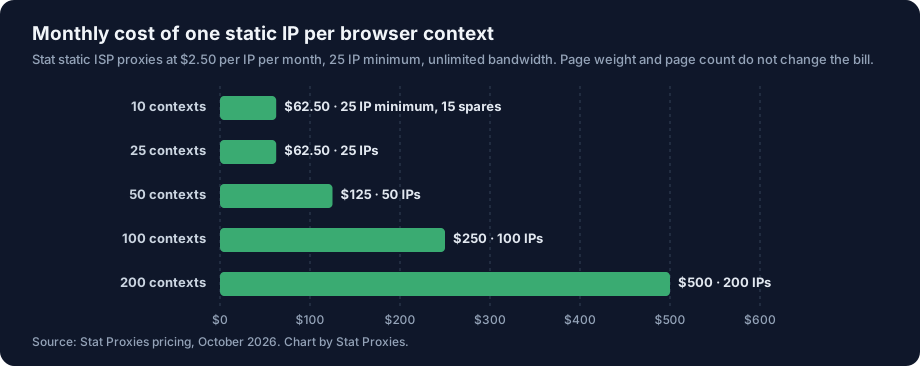
| Contexts running at once | IPs | Monthly cost |
|---|---|---|
| 10 | 25 (the minimum) | $62.50 |
| 25 | 25 | $62.50 |
| 50 | 50 | $125 |
| 100 | 100 | $250 |
| 200 | 200 | $500 |
The bars stay the same height whether each context loads 50 pages a day or 50,000. That's the point of flat pricing for browsers, because a browser is the heaviest client you can put behind a proxy.
Why browsers are a bandwidth problem
A browser fetches everything a page asks for. An HTTP client fetching the same URL gets the HTML and stops. The 2025 Web Almanac measured the median desktop home page at 2,862 KB in its July 2025 crawl, and broke the median down by resource type:
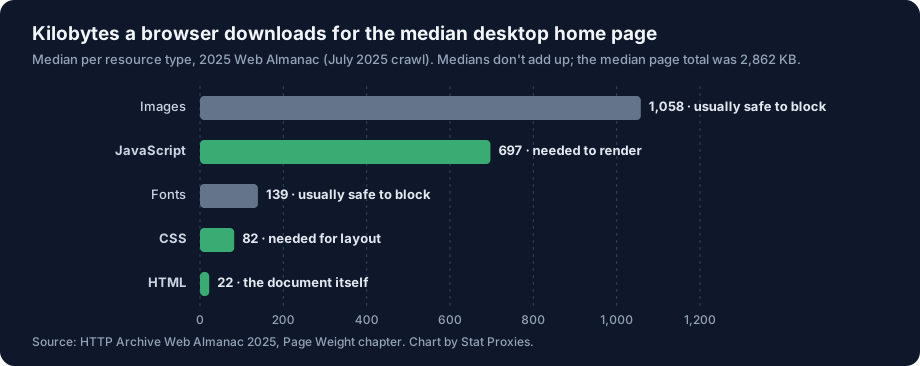
The HTML, the part most data jobs actually parse, is 22 KB of a 2,862 KB page. Images are the largest single type at 1,058 KB, with JavaScript next at 697 KB. Medians don't add up exactly, so treat these as proportions, not a sum.
Put that in monthly terms. 100,000 rendered page loads at the median 2,862 KB move about 286 GB. On a per-GB plan, multiply 286 by your rate per GB; our flat-rate vs per-GB breakeven post has dated rates for eleven plans. On flat per-IP pricing, the 286 GB costs nothing extra.
Block what you don't parse
Blocking images, fonts and media cuts the bytes and the render time, and most data jobs never look at them. In Playwright, route those requests to abort before the page loads:
const SKIP = new Set(['image', 'font', 'media']);
await context.route('**/*', (route) =>
  SKIP.has(route.request().resourceType()) ? route.abort() : route.continue());
Using the medians above as a rough guide, images and fonts are about 1.2 MB of a typical home page. Keep JavaScript and CSS, because the page needs them to render. Inner pages carry fewer images than home pages (the same Almanac puts the median desktop inner page at 442 KB of images), so measure your own targets before you budget.
When Stat is the wrong pick
- Your targets are outside the US. Every Stat IP is in the US. A UK team checking UK sites needs UK IPs, because many sites serve different content, prices and consent flows by country.
- You need a specific US city or state. We don't offer state or city targeting.
- The target blocks any IP it has seen before. Some sites challenge repeat visitors on sight. A static IP, ours included, gets recognized there, and a large rotating pool is the right tool even at per-GB prices.
- You run fewer than a handful of contexts, briefly. The minimum order is 25 IPs. A one-week test with three contexts can be cheaper on a small per-GB plan, as long as you block images.
- The block is about the browser, not the IP. A clean IP doesn't hide
navigator.webdriver, a UTC clock or a mismatched user agent. Fix the layer table above first; a new proxy won't.
If your browsers work on US sites and run every day, static ISP proxies at $2.50 per IP per month fit the one-IP-per-context model directly, and the pricing page shows the plans. IPs go live the moment you check out, and there's no concurrency limit. For background on what headless browsers are and how they differ from headed ones, start with what are headless browsers.
FAQ
What kind of proxy works best with a headless browser?
Static ISP proxies, with one IP per browser context. A context keeps cookies, a TLS session and a fingerprint for its whole life, and an IP that changes mid-session contradicts them. ISP addresses are registered to internet service providers, so IP-intelligence services classify them as ISP traffic, not hosting. Pick a provider with flat per-IP pricing if you can, because a browser downloads every image and script on the page, and per-GB billing grows with each one.
Can I use a different proxy for each Playwright browser context?
Yes. Pass a proxy object to browser.newContext() with server, username and password, and each context gets its own exit IP inside one browser process. Set timezoneId and locale on the same context so they match the IP. Puppeteer does the same with browser.createBrowserContext({ proxyServer }), plus page.authenticate() on every page for the credentials.
Why does my proxy work in curl but fail in headless Chrome?
Chromium ignores a username and password written into the proxy URL. Its own networking docs say it "will not use any credentials embedded in the proxy settings." curl reads them from the URL and sends them itself. In headless Chrome the proxy answers 407, there's no login prompt, and the page fails. Pass the credentials through Playwright's proxy object or Puppeteer's page.authenticate() instead.
Do headless browsers use a lot of proxy bandwidth?
Yes, far more than an HTTP client. The 2025 Web Almanac measured the median desktop home page at 2,862 KB, of which the HTML was 22 KB. A browser downloads the whole page, so 100,000 page loads move about 286 GB. Blocking images and fonts cuts roughly 1.2 MB from a median home page. On flat per-IP plans with unlimited bandwidth, those bytes don't change the bill.
Should a headless browser use a SOCKS5 or an HTTP proxy?
Use the HTTP endpoint for authenticated proxies. Chromium's docs state that no authentication methods are supported for SOCKS5 in Chrome, so a SOCKS5 proxy with a username and password can't be used from the browser directly. HTTPS still runs end to end through the HTTP proxy's CONNECT tunnel. Stat accepts the same login over HTTP, HTTPS and SOCKS5, so switching costs nothing.
Sources
- Chromium proxy behavior, credentials and SOCKS5 authentication: net/docs/proxy.md, checked October 10, 2026.
- WebRTC IP handling switch: Chromium content_switches.cc and webrtc_ip_handling_policy.cc, checked October 10, 2026.
- Playwright per-context
proxy,timezoneIdandlocaleoptions: BrowserContext options and network docs, checked October 10, 2026. - Puppeteer
createBrowserContext({ proxyServer }),page.authenticate()andpage.emulateTimezone(): Puppeteer API docs, checked October 10, 2026. - DevTools
Fetch.authRequiredand its Server and Proxy challenge sources: Chrome DevTools Protocol, Fetch domain, checked October 10, 2026. - CONNECT tunnels and end-to-end TLS: RFC 9110, section 9.3.6, June 2022.
- IP geolocation
timezonefield (IANA names): IPinfo geolocation API docs, checked October 10, 2026. - Page weight by resource type: Web Almanac 2025, Page Weight chapter, HTTP Archive, July 2025 crawl.
- Headless browser defaults (user agent, timezone, language,
navigator.webdriver): measured by Stat Proxies on October 10, 2026, Playwright 1.56.1 with Chromium 141.0.7390.37 on Linux. - Stat Proxies prices: pricing, October 2026.