Which Proxies Give Price-Intelligence Teams the Fastest Refreshes?
By Nicholas St. Germain. Published
For price-intelligence teams, the fastest refreshes come from proxies that keep checks from failing. A refresh takes as long as its slowest step, and server response, download and parsing usually cost hundreds of milliseconds, while a 10–50 ms proxy hop is paid once per round trip. One failed check that retries costs seconds. Stat's static ISP proxies cost $2.50 per IP per month with unlimited bandwidth and keep a fixed US vantage point. They're the wrong pick for non-US marketplaces.
This post splits one price check into its phases with curl, puts a number on each, and compares them with the things that actually make a price late: the gap between checks, cold connections, and retries. There are two charts, a curl template, and a 59-line Python script that times your own refresh loop through any proxy.
Our bias, up front
We sell static US ISP proxies: $2.50 per IP per month, a 25 IP minimum, unlimited bandwidth, 10–50 ms latency, over HTTP, HTTPS and SOCKS5 with the same login. We don't sell rotating pools or IPs outside the US.
The short answer by refresh target
"Instant" means different things to a repricing engine and to a weekly report. This table matches the refresh you want to what actually sets its speed.
| Refresh target | What sets how fresh the price is | Proxy setup that fits |
|---|---|---|
| Daily or every few hours | Your schedule. Network time is a rounding error | Any stable proxy. Static ISP keeps the same vantage point every run |
| Every 5 to 15 minutes | IP count against each site's per-IP tolerance | Static ISP, sized with the formula in our real-time price scraping guide |
| Every 60 seconds or faster | Retries and connection setup | Static ISP, warm connections, workers in a US East cloud region |
| Under a second ("instant") | Polling can't get there | No proxy fixes this. Ask the retailer or marketplace for a feed or an API |
| Rendered pages with heavy JavaScript | Browser render time, in seconds | Static ISP, one IP per browser context, and render only when the HTML lacks the price |
| Non-US marketplaces | Geography | Not Stat. Use a provider with IPs in that country |
The rest of the post is the arithmetic behind the middle column.
What one price check is made of
A price check over HTTPS through an HTTP proxy runs six phases in order. The first three happen only when the check opens a new connection.
- TCP connect to the proxy. One round trip between your worker and the proxy.
- CONNECT. Your client asks the proxy for a tunnel to the retailer. The proxy dials the site and answers "200 Connection established".
- TLS handshake. One round trip end to end with TLS 1.3, two with TLS 1.2 (RFC 8446).
- Request to first byte. The GET goes out, the server builds the page, and the first byte comes back. On a dynamic product page this is usually the biggest slice.
- Download. The rest of the HTML. Product pages are heavy, and price-intelligence teams pull a lot of them.
- Parse. Your code finds the price, the currency and the stock state.
Here is that check with every number spelled out. The inputs are illustrative: a 50 ms proxy hop (the top of our 10–50 ms range, to be conservative), a 20 ms round trip from the proxy to the retailer's edge, 300 ms of server time (well inside the 0.8 second "good" time to first byte that web.dev suggests), 150 ms to download the HTML and 100 ms to parse it.
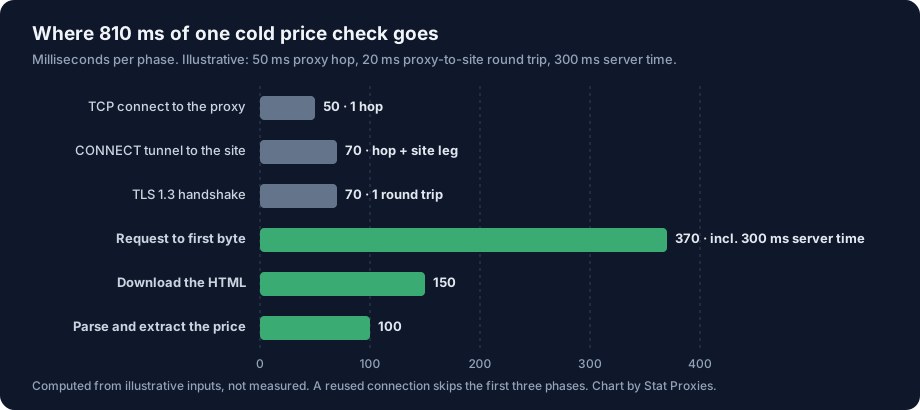
| Phase | Time (illustrative) | Paid on a reused connection? |
|---|---|---|
| TCP connect to the proxy | 50 ms | No |
| CONNECT tunnel to the site | 70 ms | No |
| TLS 1.3 handshake | 70 ms | No |
| Request to first byte | 370 ms | Yes |
| Download the HTML | 150 ms | Yes |
| Parse and extract the price | 100 ms | Yes |
| Total | 810 ms cold, 620 ms warm |
The three setup bars at the top add 190 ms, and you pay them only when a check opens a new connection. The three bars below them are the real work, waiting for the server, downloading and parsing, and they add up to 620 ms on every check. The proxy hop is inside four of the six bars: 200 ms of the cold check and 50 ms of the warm one. At the bottom of our range, a 10 ms hop, those become 40 ms and 10 ms.
So a faster proxy can save at most 160 ms on a cold check and 40 ms on a warm one. Keep those numbers in mind for the next two sections.
Measure your own phases with curl
curl reports when each phase finished, measured from the start of the request. Save this as refresh.txt:
proxy dns   %{time_namelookup}s\n
connect     %{time_connect}s\n
tls done    %{time_appconnect}s\n
first byte  %{time_starttransfer}s\n
total       %{time_total}s\n
new conns   %{num_connects}\n\n
Then fetch the same product page twice in one command, so the second fetch can reuse the first one's connection:
curl -s -x http://USERNAME:PASSWORD@proxy.statproxies.com:8080 -w @refresh.txt \
  -o /dev/null https://www.example.com/product/123 \
  -o /dev/null https://www.example.com/product/123
Each timer is cumulative, so subtract the one before it to get a phase. Through an HTTP proxy, time_namelookup is the lookup of the proxy's hostname, because the proxy resolves the retailer's name for you. time_connect is the TCP handshake with the proxy, and time_appconnect minus time_connect is the CONNECT plus the TLS handshake. time_starttransfer minus time_appconnect is the request and the server's work. On the second fetch, num_connects should print 0 and the connect and TLS timers should drop to near zero: that's the warm check, and the difference between the two totals is what connection setup costs you on that site. curl only reuses connections between URLs in the same command, never across separate runs, so a loop of single-URL curl calls measures cold checks every time. Our curl proxy testing guide covers the other flags.
How fresh is a price, really?
A price in your database is never as fresh as the check that fetched it. If you check a product every 60 seconds and someone reads the price at a random moment, it was fetched 30 seconds ago on average, plus the time the check itself took. The interval dominates.
| Refresh interval | Average age of a price when read (interval ÷ 2 + 0.81 s check) | Share saved by a 10 ms hop instead of 50 ms (0.16 s, cold) |
|---|---|---|
| Every 60 seconds | 30.81 s | 0.5% |
| Every 5 minutes | 150.81 s | 0.1% |
| Every 15 minutes | 450.81 s | 0.04% |
At a 60-second refresh, switching to a proxy five times faster makes your prices half a percent fresher. Halving the interval makes them almost twice as fresh. That costs IPs: each IP can only make so many requests an hour to one site before it gets rate-limited, so checking twice as often means about twice the IPs. The sizing formula and a calculator for that are in our real-time price scraping guide.
Retries cost more than any proxy hop
A check that fails has to wait and run again, and the waiting is measured in seconds. This chart puts the proxy hop next to three common failures, using the same illustrative 810 ms cold check.
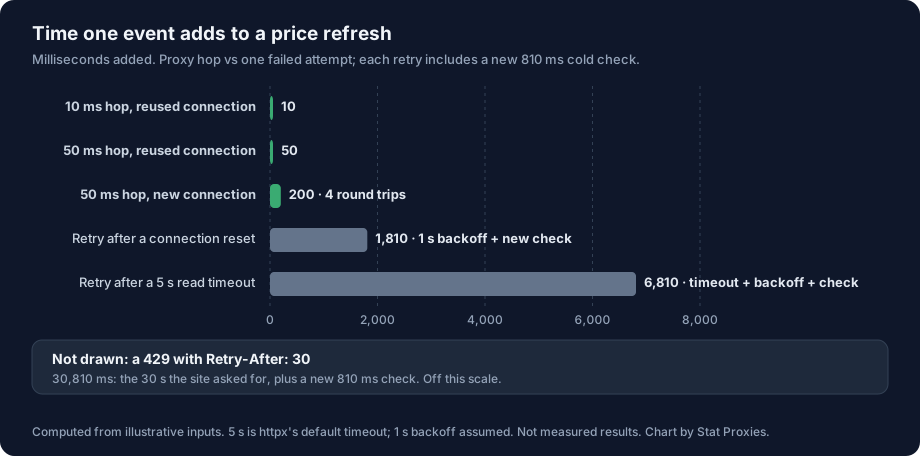
| Event | Time added to the refresh | How it adds up |
|---|---|---|
| 10 ms hop, reused connection | 10 ms | One round trip |
| 50 ms hop, reused connection | 50 ms | One round trip |
| 50 ms hop, new connection | 200 ms | Four round trips |
| Retry after a connection reset | 1,810 ms | 1 s backoff + a new 810 ms check |
| Retry after a 5 s read timeout | 6,810 ms | 5 s timeout + 1 s backoff + 810 ms |
| 429 with Retry-After: 30 | 30,810 ms | 30 s wait + 810 ms |
One read timeout costs as much time as the 50 ms hop does on 136 warm checks. One 429 that asks you to wait 30 seconds costs as much as the hop on 616 of them. Spread over every check, a 1% rate of read timeouts costs 68 ms per check on average, more than the 40 ms between the top and bottom of our latency range. A 1% rate of 429s with a 30 second Retry-After costs 308 ms.
The 5 seconds isn't arbitrary. It's the default timeout in httpx, the Python client in the script below, and plenty of price checkers run with the default. A product page that sometimes takes 6 seconds to render will time out, retry and take 13.
Which failures are the proxy's fault
Before you blame or switch a provider, sort failures by where they come from:
- 407 Proxy Authentication Required, refused CONNECT, or a connect timeout to the proxy. The proxy or your proxy config. Our 407 guide and connection refused and timeout guide cover the fixes.
- 403, a challenge page, or a 200 with no price in it. The site decided not to serve that request. The IP's reputation is part of that decision, along with your headers, your request rate and your client's fingerprint.
- 429 Too Many Requests. You asked for too much from one IP or one session. RFC 6585 lets the server add a Retry-After header saying how long to wait, in seconds or as a date (RFC 9110). Honor it, and spread the load over more IPs.
- A read timeout after the tunnel is up. Usually a slow page on the site's end. Raise the read timeout for that site instead of retrying into the same wall.
A static IP helps with the middle two because the site sees the same address check the same pages at the same pace every day, and you can see which IP and which site the failures cluster on. Our post on why a proxy is slow or blocked walks through telling a slow proxy from a blocked one.
Back off with jitter
When you do retry, wait longer each time and add randomness, so a hundred checks that failed together don't all retry in the same instant. The AWS Architecture Blog's write-up on exponential backoff and jitter shows why "full jitter", a random wait between zero and the current backoff cap, spreads retries best. Cap the number of attempts too. A price that failed three times is better marked stale than retried for a minute.
Keep connections warm between refreshes
Every cold check pays the three setup phases again. In our illustrative numbers that's 190 ms, and 200 ms of the proxy hop rides on a cold check against 50 ms on a warm one. Two defaults decide whether your checks start cold.
Your client's idle timeout. httpx closes a pooled connection after it has sat idle for 5 seconds (keepalive_expiry=5.0) and keeps at most 20 idle connections by default. If you check each site every 30 seconds, every check starts cold, however fast the proxy is. Set keepalive_expiry above your interval, as the script below does.
The server's idle timeout. The retailer closes idle connections on its own schedule. nginx, a common front end, defaults to keepalive_timeout 75s (nginx docs). Other servers and CDNs pick their own values. If your interval is longer than the site's timeout, the connection is gone by the next check no matter what your client does.
The fix that works with both: batch by host. Check a site's products back to back while its connection is open, then move to the next site. Thirty products checked together on one warm connection pay the setup cost once; the same thirty checked at scattered times each pay it. HTTP/2 helps here as well, since several requests share one connection.
The other half is where your workers sit. The hop includes the leg from your worker to the proxy. Stat's ISP proxies are in Virginia and New Jersey, so workers in a US East cloud region keep that leg short.
A script that times your refresh loop
This checker runs five refresh rounds 30 seconds apart over a list of product URLs, through one proxy, with connections kept warm between rounds. It records the first round (new connections) apart from the rest (reused), times parsing on its own, retries 429 and 5xx responses up to twice with full jitter and Retry-After, and prints p50 and p95 for each part. Run it once through the proxy and once direct to get your hop cost on your own targets.
# pip install httpx
# python refresh_budget.py urls.txt   (one product URL per line)
# PROXY= python refresh_budget.py urls.txt   (direct, for a baseline)
import asyncio, os, random, re, statistics, sys, time

import httpx

PROXY = os.environ.get("PROXY", "http://USERNAME:PASSWORD@proxy.statproxies.com:8080")
ROUNDS, INTERVAL = 5, 30          # five refreshes, 30 seconds apart
PRICE = re.compile(r'"price"\s*:\s*"?([0-9]+(?:\.[0-9]+)?)')
log = {"fetch, new conn": [], "fetch, reused": [], "parse": [], "waited": [], "total": []}
retries = failures = 0

async def check(client: httpx.AsyncClient, url: str, cold: bool) -> None:
    global retries, failures
    start, waited = time.perf_counter(), 0.0
    for attempt in range(3):
        try:
            t0 = time.perf_counter()
            r = await client.get(url)
            fetch = time.perf_counter() - t0
            if r.status_code not in (429, 500, 502, 503, 504):
                break
            ra = r.headers.get("retry-after", "")
            delay = float(ra) if ra.isdigit() else 0.0
        except httpx.TransportError:
            r, delay = None, 0.0
        if attempt == 2:
            failures += 1
            return
        retries += 1
        delay = max(delay, random.uniform(0, 2 ** attempt))  # full jitter
        waited += delay
        await asyncio.sleep(delay)
    t1 = time.perf_counter()
    PRICE.search(r.text)          # swap in your real extractor here
    log["parse"].append(time.perf_counter() - t1)
    log["fetch, new conn" if cold else "fetch, reused"].append(fetch)
    log["waited"].append(waited)
    log["total"].append(time.perf_counter() - start)

async def main(path: str) -> None:
    urls = [u.strip() for u in open(path) if u.strip()]
    timeout = httpx.Timeout(10.0, connect=5.0)
    limits = httpx.Limits(max_keepalive_connections=50, keepalive_expiry=INTERVAL * 2)
    async with httpx.AsyncClient(proxy=PROXY or None, timeout=timeout, limits=limits) as client:
        for n in range(ROUNDS):
            began = time.perf_counter()
            await asyncio.gather(*(check(client, u, n == 0) for u in urls))
            if n < ROUNDS - 1:
                await asyncio.sleep(max(0, INTERVAL - (time.perf_counter() - began)))
    for name, xs in log.items():
        if xs:
            xs.sort()
            print(f"{name:15} p50 {statistics.median(xs) * 1000:7.0f} ms   "
                  f"p95 {xs[int(len(xs) * 0.95)] * 1000:7.0f} ms")
    print(f"checks {len(log['total'])}, retries {retries}, failed {failures}")

asyncio.run(main(sys.argv[1]))
How to read the output:
- "fetch, new conn" minus "fetch, reused" is what connection setup costs you on these sites. If it's large and your real schedule checks each site less often than your client's idle timeout, batch by host.
- "parse" is your own code. A regex over JSON-LD takes well under a millisecond; a full HTML parse of a heavy page can take far longer. If parse rivals fetch, parse less.
- "waited" at p95 is the retry tax. If it's above zero on more than a few percent of checks, fix the cause (rate, timeouts, headers, IP count) before you touch anything else.
- The proxy run minus the direct run is your hop cost. Compare it with "waited" before deciding a proxy is slow.
The URLs share one connection pool, so keep the list to one or a few sites per run and stay well inside each site's rate limits. The script makes 5 requests per URL in two minutes.
When Stat is the wrong pick
- You track non-US marketplaces. Every Stat IP is in the US. Prices on Amazon.de or a UK grocer need IPs in that country.
- You need city or state prices. Some retailers price by store or ZIP code. We don't offer state or city targeting.
- Your targets block any IP they've seen before. On those sites a static IP, ours included, gets recognized, and a large rotating pool is the right tool even at per-GB prices.
- You need sub-second updates. Polling at that rate isn't a proxy problem. Ask for a feed or an API.
- You check a handful of products a day. The 25 IP minimum is $62.50 a month, more than a small job needs.
If you refresh US retail prices every few minutes or faster, the time goes to the gap between checks, cold connections and retries, and a static IP with no bandwidth meter lets you spend on IP count instead of bytes. Static ISP proxies cost $2.50 per IP per month with a 25 IP minimum, unlimited bandwidth and no concurrency limit, and go live the moment you check out. The price monitoring use case covers the rest of the setup.
FAQ
Do low-latency proxies make price scraping faster?
A little. A proxy adds its latency once per network round trip. On a reused connection a 10 to 50 ms hop adds 10 to 50 ms to a check that already takes hundreds of milliseconds of server time, download and parsing. On a new connection it's paid about four times. Retries, timeouts and the gap between scheduled checks add seconds to minutes, so they matter far more to how fresh your prices are.
How do I measure where the time goes in one price check?
Use curl's write-out timers: time_namelookup, time_connect, time_appconnect, time_starttransfer and time_total. Each is measured from the start, so subtract the previous one to get a phase. Fetch the same URL twice in one curl command; the second fetch reuses the connection, and num_connects drops to 0. The difference between the two totals is what connection setup costs on that site.
Why are my proxied requests slow even though the proxy is fast?
Usually because every request opens a new connection. Your HTTP client may close idle connections quickly (httpx closes them after 5 seconds by default), so a check every 30 seconds starts cold each time and pays the TCP connect, CONNECT and TLS handshake again. Raise the keep-alive expiry above your interval and check each site's products back to back.
How often should a price-intelligence team refresh prices?
Match the refresh to how often the competitor reprices and to what the data drives. Price2Spy suggests checks every few hours against competitors that reprice automatically, and daily checks for manual price reviews. Each halving of the interval roughly doubles the IPs you need at the same per-IP rate. Tier your catalog so fast-moving, high-revenue products refresh most often and stable ones run daily.
What timeout should a price checker use?
Set the connect timeout short, around 5 seconds, because a proxy or site that can't accept a connection by then won't do better later. Set the read timeout from measurement: a little above the slowest normal page on that site. Then cap retries at two or three with exponential backoff and jitter, and honor Retry-After on 429 responses. A price that fails three times should be marked stale.
Sources
- curl write-out variables: the curl 8.5.0 manual (
curl --manual) and everything curl, available write-out variables, checked October 14, 2026. Connection reuse within one command line is described in the same manual. - httpx defaults (5 second timeout, 5 second keep-alive expiry, 20 keep-alive connections): httpx 0.28.1 source,
_config.py, checked October 14, 2026. - TLS 1.3 one round-trip handshake: RFC 8446, August 2018.
- 429 Too Many Requests: RFC 6585, April 2012. Retry-After format: RFC 9110, section 10.2.3, June 2022.
- nginx
keepalive_timeoutdefault of 75 seconds: nginx core module docs, checked October 14, 2026. - Time to first byte thresholds: web.dev, Time to First Byte, checked October 14, 2026.
- Backoff with jitter: AWS Architecture Blog, Exponential Backoff and Jitter, updated May 2023.
- Monitoring frequency guidance: Price2Spy, How often should retailers monitor competitor prices?, checked October 14, 2026.
- Stat Proxies prices: pricing, October 2026.