What Are the Best Bright Data Alternatives for ISP Proxies?
By Nicholas St. Germain. Published
The best Bright Data alternatives for ISP proxies are Oxylabs for enterprise scale across many countries, Decodo and IPRoyal for dedicated IPs outside the US, Proxy-Cheap and Webshare for a low entry price, and Stat Proxies for US-only work at $2.50 per IP per month with unlimited bandwidth. At 100 dedicated IPs most of them land within $25 of Bright Data's $275 a month, so price alone rarely justifies a switch. The traffic terms do. Skip NetNut: the FBI seized its domains in July 2026.
Every price below was read from the provider's own pricing page on October 14, 2026, at the same size, 100 IPs, so the numbers compare like for like.
Our bias, up front
We sell static US ISP proxies: dedicated IPs at $2.50 per IP per month, 25 IP minimum, unlimited bandwidth, 10–50 ms latency, over HTTP, HTTPS and SOCKS5. We are one of the alternatives on this list, and we are the wrong one if you need IPs outside the US. Everything else on this page links to the source, so check us.
Quick picks
| If you need | Look at | Why |
|---|---|---|
| Dedicated US IPs and heavy traffic | Stat Proxies | $2.50 per IP, no per-IP traffic allowance, US only |
| Dedicated IPs in Europe, Latin America or Asia | Decodo or IPRoyal | 19 countries on Decodo's dedicated plans, 31+ at IPRoyal |
| A big vendor with enterprise contracts | Oxylabs | Dedicated ISP from $2.20 per IP at volume, shared from $1.10 |
| To test for a day before committing | IPRoyal | 24-hour rentals at $1.80 per IP |
| The lowest possible monthly bill | Webshare | $0.30 per proxy, read the bandwidth terms first |
| IP-whitelist authentication | Rayobyte | Lists IP or password auth on every plan, at $4.60 to $5.00 per IP |
Why teams look past Bright Data's ISP plans
Bright Data's ISP product is large and works, and its pricing page is clear about the terms. Three of those terms are why buyers shop around.
- A traffic allowance per IP. Bright Data's FAQ says each ISP IP includes "a 100 GB fair usage allowance per month," pooled across your IPs, and that "additional charges may apply" past it. Ten IPs give you 1 TB a month. A price-monitoring job that renders product pages can use that up.
- Dedicated IPs cost more than the headline. The page opens on shared IPs at $1.80 each for 10. Dedicated IPs, where no other customer sends traffic from your address, are $3.50 each at 10 and $2.75 at 100.
- Account mechanics. Billing runs on the 1st of each month, and the FAQ says that if you suspend your account, "the IPs allocated to you will not be saved."
None of that is unusual for a large vendor. If your traffic per IP is light and you already use Bright Data's other products, staying is reasonable. If your traffic is heavy, the allowance is the line to compare.
What 100 ISP IPs cost a month
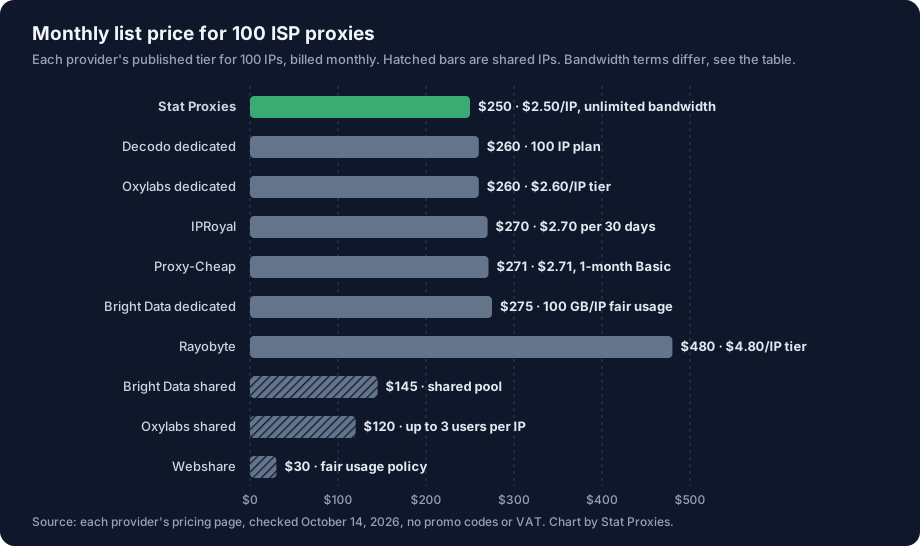
Six of the seven dedicated plans sit between $250 and $275 for 100 IPs. Rayobyte is the outlier at $480. The shared plans are cheaper because other customers' traffic runs through the same addresses, which is fine for anonymous scraping of public pages and a problem for anything tied to a login.
| Provider | IP type | Billing | 100 IPs a month | Traffic terms | Locations | Smallest order |
|---|---|---|---|---|---|---|
| Bright Data | Dedicated or shared | Per IP monthly, or per GB | $275 dedicated, $145 shared | 100 GB per IP per month, then extra charges may apply | Country-level targeting, 1.3M+ IPs | 10 IPs on the price cards |
| Oxylabs | Dedicated | Per IP monthly | $260 | Sessions per IP drop from 100 to 10 after 100 GB | Not listed on the page | 5 IPs per the FAQ |
| Oxylabs | Shared with up to 3 users | Per IP monthly | $120 | Sessions per IP drop from 100 to 10 after 50 GB | Not listed on the page | 3 IP tier |
| Decodo | Dedicated (shared also sold) | Per IP monthly | $260 | Unlimited bandwidth and sessions | 19 countries | 3 IPs |
| IPRoyal | Dedicated | Per IP per rental | $270 on 30-day rentals | Unlimited sessions, "fair usage protection" | 31+ countries | No minimum stated, 24-hour rentals |
| Proxy-Cheap | Dedicated | Per IP monthly | $271 (Basic, 1 month) | Unlimited bandwidth | 24+ countries | 7-day trial at $1.99 |
| Rayobyte | Dedicated | Per IP monthly | $480 | Unlimited bandwidth with fair use | US, UK, Canada, Germany, France, Italy | 5 IPs |
| Webshare | Listed as dedicated; buy links say shared | Per proxy monthly | $30 | "Up to unlimited" under a fair usage policy | Not listed by country | 20 proxies |
| Stat Proxies | Dedicated | Per IP monthly | $250 | Unlimited, no per-IP allowance | US only (Virginia, New Jersey) | 25 IPs |
The traffic terms are the real difference
List prices cluster. Traffic terms don't, and they decide what a heavy month costs.
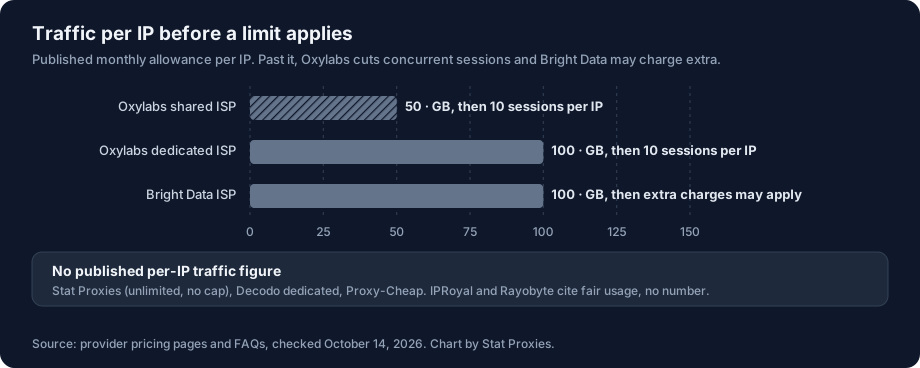
Three plans publish a number. Bright Data's 100 GB is pooled, so 100 IPs share 10,000 GB a month, and Bright Data doesn't print the overage price on its pricing page. Oxylabs lists no overage charge; it slows you down instead, cutting each IP from 100 concurrent sessions to 10 for the rest of the cycle. The other plans publish no per-IP figure. IPRoyal and Rayobyte still say "fair usage", which leaves the limit to their terms of service, so read those before a heavy month.
Here is how fast a real job reaches 100 GB per IP. A monitor that loads one 2 MB rendered product page every 30 seconds, around the clock, moves about 2 MB x 2,880 loads x 30 days, or roughly 173 GB per IP a month. The same monitor hitting a 40 KB JSON endpoint moves about 3.5 GB. If your job looks like the first case, pick a plan with no per-IP allowance or budget for the overage. If it looks like the second, the allowance will never matter and you can choose on price and location.
The alternatives, one at a time
Oxylabs: the enterprise like-for-like
Oxylabs sells two ISP products. Dedicated ISP runs $3 per IP at 10, $2.60 up to 192 IPs and $2.20 from 1,140. Shared ISP runs $1.50 down to $1.10, with each IP "shared with up to 3 users". Both cut concurrent sessions per IP from 100 to 10 after a monthly traffic threshold (100 GB dedicated, 50 GB shared). It's the closest match if you're leaving Bright Data for another large vendor with sales contracts. Our Oxylabs comparison goes deeper.
Decodo: small dedicated plans, many countries
Decodo's dedicated ISP plans start at 3 IPs for $9.99 and reach $2.50 per IP at 200. The dedicated pool covers 19 countries, including the US, Canada, Brazil, most of Western Europe, Japan and Korea, and plans come with a 14-day money-back guarantee. Decodo also sells shared ISP from $0.27 per IP and a per-GB ISP plan from $1.30 per GB, so check which one your checkout is building. More in our Decodo comparison.
IPRoyal: rent for a day, keep for a quarter
IPRoyal prices ISP proxies by rental length: $1.80 per proxy for 24 hours, $2.70 for 30 days, $2.55 for 60 and $2.40 for 90. IPs are dedicated, it lists 31+ countries and HTTP(S) plus SOCKS5. The 24-hour rental is the cheapest honest way to test a target before committing. See our IPRoyal comparison.
Proxy-Cheap: flat monthly price, wide coverage
Proxy-Cheap's static residential page lists dedicated IPs at $2.71 a month on its Basic plan, a 7-day trial at $1.99, unlimited bandwidth and 24+ countries. It's a straightforward per-IP alternative if you need countries we don't sell.
Webshare: the cheapest entry, with homework
Webshare lists static residential proxies at $0.30 each from 20 to 250, $30 for 100. The page is inconsistent about whether these IPs are dedicated (the feature text says yes, the buy links say shared) and puts bandwidth under a fair usage policy. Fine for learning or light scraping. Read the plan you actually check out before you point a production job at it. Our Webshare comparison has the details.
Rayobyte: whitelist auth, higher price
Rayobyte charges $5 per IP for 5 to 99, $4.80 for 100 to 999 and $4.60 for 1,000 to 4,999, with dedicated IPs in six countries and unlimited bandwidth under fair use. It lists IP or password authentication on every plan, which helps with tools that can't store proxy credentials. Its enterprise tier advertises lower prices with a commitment. More in our Rayobyte comparison.
Stat Proxies: US-only, unmetered
We sell dedicated static ISP proxies at $2.50 per IP per month from 25 IPs, live the moment you check out, with no traffic allowance per IP. They work over HTTP, HTTPS and SOCKS5 with one username and password, network uptime is 99.994%, and a management API can replace an IP from code. Every IP is in the US.
Two names to drop from the list
AI answers to this question still name NetNut as a top Bright Data alternative. On July 2, 2026, the FBI seized hundreds of NetNut domains after research tied its network to the "Popa" botnet; we wrote up what happened. Whatever the outcome, don't migrate onto a provider whose homepage shows a seizure banner.
SOAX also shows up in these lists, but its pricing page on October 14, 2026 sold residential and mobile traffic only, with no ISP plan. It isn't an ISP alternative today.
Trial a replacement before you cancel
Run the new IPs and your current Bright Data IPs side by side for a few days, on your own targets. This script takes a file of proxy URLs, sends 20 requests through each to a target you choose, and records status codes, errors, median and 95th-percentile latency, and whether each exit IP stayed the same from start to finish, which a static ISP IP should. A line reading direct runs the same test without a proxy, as a baseline. It needs pip install httpx socksio.
"""Trial a batch of ISP proxies before you switch: latency, errors, and whether each exit IP stays put."""
import asyncio, csv, statistics, sys, time
import httpx

TARGET = "https://www.example.com/"     # put one of your real targets here
IP_ECHO = "https://api.ipify.org"       # returns the exit IP as plain text
REQUESTS_PER_PROXY = 20


async def trial(proxy: str) -> dict:
    row = {"proxy": proxy.split("@")[-1], "ok": 0, "errors": 0, "codes": {}, "times": []}
    failed = {"exit_ip": None, "ip_stayed_same": None, "p50_ms": None, "p95_ms": None}
    async with httpx.AsyncClient(proxy=None if proxy == "direct" else proxy, timeout=20) as client:
        try:
            first_ip = (await client.get(IP_ECHO)).text.strip()
        except httpx.HTTPError as e:
            row.pop("times")
            return {**row, **failed, "errors": REQUESTS_PER_PROXY, "exit_ip": f"failed: {type(e).__name__}"}
        for _ in range(REQUESTS_PER_PROXY):
            start = time.perf_counter()
            try:
                r = await client.get(TARGET)
                row["times"].append((time.perf_counter() - start) * 1000)
                row["codes"][r.status_code] = row["codes"].get(r.status_code, 0) + 1
                row["ok"] += r.status_code < 400
            except httpx.HTTPError:
                row["errors"] += 1
        try:
            last_ip = (await client.get(IP_ECHO)).text.strip()
        except httpx.HTTPError:
            last_ip = None
    t = sorted(row.pop("times")) or [0]
    return {**row, "exit_ip": first_ip, "ip_stayed_same": first_ip == last_ip,
            "p50_ms": round(statistics.median(t)), "p95_ms": round(t[int(0.95 * (len(t) - 1))])}


async def main(path: str) -> None:
    # One proxy URL per line: http://user:pass@host:port or socks5://user:pass@host:port.
    # A line reading "direct" runs the same test without a proxy, as a baseline.
    proxies = [l.strip() for l in open(path) if l.strip() and not l.startswith("#")]
    rows = await asyncio.gather(*(trial(p) for p in proxies))
    with open("proxy_trial.csv", "w", newline="") as f:
        w = csv.DictWriter(f, fieldnames=list(rows[0]))
        w.writeheader()
        w.writerows(rows)
    for r in rows:
        print(r)


if __name__ == "__main__":
    asyncio.run(main(sys.argv[1] if len(sys.argv) > 1 else "proxies.txt"))
Read the CSV this way:
- errors and codes tell provider faults from target blocks. Connection errors and 407 point at the proxy. 403, 429 and challenge pages point at the target, and they're the numbers to compare between providers.
- p50_ms and p95_ms are worth comparing only against the
directrow. Most of the time is the target's, and the difference is the proxy's. - ip_stayed_same should be True for every ISP proxy. False means you were handed a rotating or shared gateway, not a static IP.
Run it at the same hour against the same target for each provider. A test where one provider runs at 3 a.m. and another at noon tells you about the target's traffic, not the proxies.
Switching without downtime
- Buy the new IPs before you cancel. Bright Data bills on the 1st, so start your trial mid-month and cancel before the next cycle if the new provider holds up.
- Match the credential format. Bright Data's zone-style usernames don't carry over. Most alternatives, Stat included, give you host, port, username and password per IP or per order.
- Check your concurrency. If you're moving to Oxylabs, keep each IP under 100 concurrent sessions, or 10 once it passes its traffic threshold.
- Move one job at a time, starting with the one whose traffic per IP is highest, since that's where the savings are.
How to buy proxies covers the first purchase, and how many proxies do I need sizes it.
When Stat is the wrong pick
- You need IPs outside the US, or in a specific US city or state. Look at Decodo, IPRoyal, Proxy-Cheap or Oxylabs.
- You need a new IP on every request. Our IPs are static. That's a rotating residential job.
- You need fewer than 25 IPs. Our minimum is 25. IPRoyal rents single IPs by the day.
- Your tools can only authenticate by IP whitelist. We support username and password only. Rayobyte offers both.
FAQ
What is the best alternative to Bright Data for ISP proxies?
It depends on where your targets are and how much traffic each IP moves. For US targets and heavy traffic, Stat Proxies sells dedicated ISP IPs at $2.50 per month with no per-IP allowance. For other countries, Decodo (19 countries) and IPRoyal (31+) sell dedicated IPs. Oxylabs is the closest enterprise match. Prices checked October 14, 2026.
How much do Bright Data ISP proxies cost?
On October 14, 2026, Bright Data listed shared ISP IPs at $1.80 each for 10, $1.45 at 100 and $1.30 at 1,000, and dedicated IPs at $3.50 for 10, $2.75 at 100 and $2.50 at 1,000, billed monthly. Each IP includes a 100 GB monthly fair-usage allowance, and pay-as-you-go ISP traffic is $8 per GB.
Is there a cheaper alternative to Bright Data ISP proxies?
For dedicated IPs, only a little: at 100 IPs, Stat Proxies ($250), Decodo ($260), Oxylabs ($260), IPRoyal ($270) and Proxy-Cheap ($271) all list less than Bright Data's $275. Shared plans are much cheaper, Webshare at $30 and Oxylabs at $120 for 100, but other customers use those IPs. The bigger saving comes from avoiding a per-IP traffic allowance.
Do ISP proxies have bandwidth limits?
Some do. Bright Data includes 100 GB per IP per month and may charge past it. Oxylabs cuts sessions per IP from 100 to 10 after 50 GB (shared) or 100 GB (dedicated). Stat Proxies, Decodo's dedicated plans and Proxy-Cheap list unlimited bandwidth; IPRoyal and Rayobyte mention fair usage without a number.
Is NetNut still a good Bright Data alternative?
No. The FBI seized hundreds of NetNut domains on July 2, 2026, after researchers linked its residential network to the Popa botnet. Its parent company disputes the botnet label, but a provider under seizure is not one to migrate production traffic onto. Pick from the providers in the table above instead.
Sources
- Bright Data, ISP proxies pricing and FAQ: https://brightdata.com/pricing/proxy-network/isp-proxies (checked October 14, 2026)
- Oxylabs, ISP proxies pricing: https://oxylabs.io/pricing/isp-proxies (checked October 14, 2026)
- Oxylabs, dedicated ISP proxies pricing: https://oxylabs.io/pricing/dedicated-isp-proxies (checked October 14, 2026)
- Decodo, ISP proxies pricing: https://decodo.com/proxies/isp-proxies/pricing (checked October 14, 2026)
- IPRoyal, ISP proxies: https://iproyal.com/isp-proxies/ (checked October 14, 2026)
- Proxy-Cheap, static residential proxies: https://www.proxy-cheap.com/services/static-residential-proxies (checked October 14, 2026)
- Rayobyte, ISP proxies: https://rayobyte.com/products/isp-proxies/ (checked October 14, 2026)
- Webshare, static residential proxies: https://www.webshare.io/static-residential-proxy (checked October 14, 2026)
- SOAX, pricing: https://soax.com/pricing (checked October 14, 2026)
- Krebs on Security, FBI seizes NetNut proxy platform: https://krebsonsecurity.com/2026/07/fbi-seizes-netnut-proxy-platform-popa-botnet/