Which proxies are best for multiple social media accounts?
By Nicholas St. Germain. Published
For managing multiple social media accounts, the most stable choice is one dedicated static ISP proxy per account: the IP sits on a home internet carrier's network and stays the same for as long as you pay, so every login comes from the same address. Mobile proxies cost far more and suit creating and warming new accounts on mobile-first apps. Rotating residential proxies work for short tasks but change IP when the sticky session ends, and datacenter proxies are the type social platforms flag first.
Disclosure: Stat Proxies wrote this guide, and we sell static ISP proxies, the type it recommends for running established accounts. We cover US accounts only, and the sections below say when another type or provider is the better buy. Competitor prices come from each provider's pricing page. Prices checked October 2026.
Quick answer: proxy types for social media accounts
| Proxy type | Does the IP stay the same? | Network the platform sees | Pricing model | Example price | Best for |
|---|---|---|---|---|---|
| Static ISP | Yes, for as long as you pay | Residential ISP | Per IP per month | Stat Proxies $2.50/IP; IPRoyal $2.70/IP for 30 days | Running established accounts day to day |
| Mobile | Changes as the carrier reassigns it | Mobile carrier | Per GB, or per dedicated proxy | Decodo $3.75/GB on the 2 GB plan; IPRoyal dedicated from $130/month | Creating and warming accounts on mobile-first apps |
| Rotating residential | Only until the sticky session ends | Residential ISP | Per GB | Decodo $4/GB pay as you go; Oxylabs $6/GB at 5 GB | Short sessions, scraping public profiles |
| Datacenter | Yes | Hosting provider | Per IP per month | Bright Data dedicated $2.20/IP at 10 IPs | Scraping public pages without logging in |
What a platform checks about your IP
Social platforms score the address before they look at your posts. Two questions matter most.
The first is which network the IP belongs to. Every IP sits in an ASN, and anyone can look up whether that ASN belongs to a home internet provider, a mobile carrier or a hosting company. Normal users log in from the first two. A login from a hosting ASN is unusual for a consumer app, which is why it draws checks.
The second is whether the IP is the one this account always uses. A person logs in from their home connection most days and their phone the rest. An account that shows up from a new city each session looks like a stolen login, and you get a verification prompt or a lock. When two accounts share one IP, the platform can link them, and a ban on one can spill onto the other. Antidetect browser vendors give the same advice; our how many proxies do I need post quotes Multilogin and GoLogin telling users to give every browser profile its own proxy.
One IP per account, kept for the life of the account, satisfies both checks.
Static ISP proxies: the default for running accounts
A static ISP proxy is an IP on a residential carrier's network, hosted on server hardware, and assigned to you for as long as you pay. It answers both questions well: the network is residential, and the IP never moves.
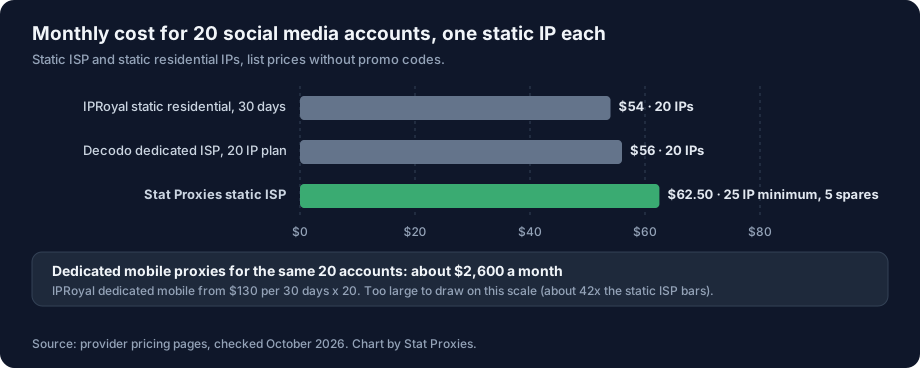
Stat Proxies. Our static ISP proxies cost $2.50 per IP per month with a 25 IP minimum, so 20 accounts cost the same as 25: $62.50 a month, with 5 spares. Each IP is dedicated to your account, on a residential ASN from major US Tier-1 carriers, with unlimited bandwidth, and a flagged IP is replaced free within 24 hours of a report. We support HTTP, HTTPS and SOCKS5 with username and password.
Where we are the wrong pick: all our ISP IPs are in Virginia and New Jersey. If you manage accounts for a bakery in Denver and want the IP to sit in Colorado, we cannot do that, and accounts outside the US need another provider entirely. We also sell nothing below 25 IPs on this product.
IPRoyal rents dedicated static residential IPs at $2.70 per IP for 30 days or $2.40 for 90 days, in 31+ countries with unlimited traffic. For 20 accounts that is $54 a month at the 30-day rate, and you get countries we lack.
Decodo sells dedicated ISP IPs at $2.80 per IP for a 20 IP plan ($56 a month), across about 15 countries, with a 14-day money-back guarantee. Its shared ISP plans from $0.27 per IP put other customers on your IPs, which defeats the point for account work.
Oxylabs lists ISP IPs from $1.20 to $1.60 each, shared with up to 3 users. Cheap, but a shared IP means strangers' accounts share your address. We would not run client accounts on it.
Mobile proxies: for new accounts on mobile-first apps
Mobile proxies route through phones or modems on cellular networks. Carriers put many subscribers behind a single public IP using carrier-grade NAT, so platforms hesitate to block a mobile IP outright: they would lock out every real user behind it. That makes mobile IPs forgiving when you create accounts or warm them up on apps like TikTok and Instagram, which expect phone traffic.
The costs are the price and the stability. Decodo's mobile plans run from $3.75 per GB on 2 GB down to $2.75 per GB on 100 GB, across 10M+ IPs from 700+ carriers. IPRoyal sells dedicated mobile proxies from $130 per 30 days, so 20 accounts each on their own dedicated mobile proxy would run about $2,600 a month. SOAX keeps a mobile IP for up to 60 minutes in sticky mode. Mobile IPs also change when the carrier reassigns them, so an account does not keep one address the way it does on a static ISP IP.
A common split: create and warm accounts on mobile, then move each to its own static ISP IP and leave it there. Move each account once and leave it on that IP.
Rotating residential proxies: fine for short sessions
Rotating residential proxies come from a large pool of home IPs, billed by the gigabyte. A sticky session holds one IP for a set time. IPRoyal lists sticky sessions of up to 7 days, and SOAX mobile tops out at 60 minutes. When the session ends, you get a different IP, possibly in a different city.
That works for scraping public profiles or running a one-off task. For accounts you log into every day, a new IP every week (or every hour) is the pattern that triggers verification. Per-GB billing also makes cost hard to predict when you run browsers that load video feeds. Our flat-rate vs per-GB breakeven post shows where the crossover sits.
Datacenter proxies: skip them for logged-in accounts
Datacenter IPs are cheap and stable. Bright Data's dedicated datacenter IPs run $2.20 each at 10 IPs and $1.30 at 1,000. The ASN says "hosting company" to every platform that checks, and social apps check. Use datacenter IPs for reading public pages without logging in, and keep them away from accounts you care about. Our datacenter vs residential vs ISP guide covers the ASN difference in more detail.
Cost for 20 accounts, side by side
| Setup | Monthly cost | Source |
|---|---|---|
| Stat Proxies static ISP, 25 IP minimum | $62.50 (5 spare IPs) | Stat Proxies pricing |
| IPRoyal static residential, 30 days | $54 (starting price) | IPRoyal |
| Decodo dedicated ISP, 20 IP plan | $56 | Decodo |
| IPRoyal dedicated mobile, 30 days | about $2,600 (starting price) | IPRoyal |
| Rotating residential or per-GB mobile | Depends on traffic | Per-GB rates above |
How we compared
- IP stability. How long one account keeps one IP.
- Network type. Residential, mobile or hosting ASN, as a platform would see it.
- Sharing. Whether another customer's accounts can sit on your IP.
- Cost at 20 accounts. From each provider's list price, checked October 2026, without promo codes.
We did not run ban-rate tests on any platform, and we do not quote ban or trust-score numbers from other vendors. Platform rules change often. Behavior on the account (posting rate, follows, DMs) matters as much as the IP, and no proxy saves an account that acts like a bot.
FAQ
What is the best proxy type for managing multiple social media accounts?
A dedicated static ISP proxy for each account. The IP belongs to a residential carrier and stays the same for as long as you pay, so each account logs in from one consistent address. Stat Proxies sells US static ISP proxies at $2.50 per IP per month; IPRoyal and Decodo sell them in other countries.
Which ISP proxies are most stable for managing multiple social media accounts?
Dedicated static ISP proxies with no rotation and no sharing. Stat Proxies, IPRoyal and Decodo's dedicated plans assign each IP to one customer. Avoid shared ISP plans, such as Oxylabs' IPs shared with up to 3 users, for accounts you log into.
Should I use one proxy per social media account?
Yes. Accounts that share an IP can be linked, so a ban on one can reach the others. Give every account its own IP and its own browser profile, and keep that pairing for the life of the account.
Are mobile proxies better than ISP proxies for Instagram and TikTok?
Mobile proxies are more forgiving when you create and warm new accounts, because carriers put many real users behind one IP. They cost much more (IPRoyal dedicated mobile starts at $130 a month) and the IP changes when the carrier reassigns it. For running established accounts every day, a static ISP IP is steadier and cheaper.
Can I use residential proxies for social media accounts?
Rotating residential proxies work for short tasks and public scraping. For daily logins, the IP changes when the sticky session expires (up to 7 days on IPRoyal), and a changing IP is what triggers verification prompts.
Why do datacenter proxies get social media accounts banned?
Platforms look up the ASN behind every login. A datacenter IP belongs to a hosting company, which normal users do not log in from, so logins from it draw more verification prompts and checks.
How much do proxies for 20 social media accounts cost?
About $54 to $63 a month on static ISP proxies: $62.50 at Stat Proxies (25 IP minimum), $54 at IPRoyal on 30-day rentals, $56 at Decodo. Dedicated mobile proxies for 20 accounts run about $2,600 a month at IPRoyal's starting price.