How Do You Manage Proxies Through an API?
By Nicholas St. Germain. Published
Several proxy providers let you manage IPs through an API, but they cover different jobs. Bright Data's API adds static IPs to a zone, and IPRoyal's reseller API changes credentials on an order. Stat's management API covers the whole lifecycle of a static ISP order with one Bearer token: buy IPs, export the list in your tool's format, change the password, read usage and cancel. Stat IPs are $2.50 per IP per month with unlimited bandwidth, US only.
This post walks through every endpoint with working curl, the limits that shape how you automate them, and a 54-line Python CLI that orders, exports, tests and re-passwords proxies.
What can the Stat proxy API do?
The API manages orders: everything you can do to an order in the dashboard, from code. It doesn't sit in the request path. Your scraper still connects to each proxy with a username and password; the API is how you get, change and inspect those proxies.
All endpoints live under https://dashboard.statproxies.com/api/v2/order and take Authorization: Bearer <key>. You create keys in the dashboard under Settings, API keys, and a key can belong to you or to your organization.
| Job | Endpoint | Limit | What to know |
|---|---|---|---|
| Buy IPs | POST /newscale |
60 calls a minute per key | Billed like a dashboard order, then provisioned. Optional customer tag |
| List orders | GET /list |
60 a minute per key | status is active, cancelled (still usable) or expired |
| Export proxies | GET /fetch/{order_id} |
60 a minute per key | Four line formats, a SOCKS5 list, OS profile flags |
| Find a client's orders | GET /fetch/customer/{customer} |
60 a minute per key | Every order tagged with that customer |
| Change the password | POST /password/{order_id} |
1 per order per hour | Old password gets 407 the moment it returns |
| Read usage | GET /usage/{order_id} |
60 a minute per key | Megabytes and requests per bucket, top 100 domains |
| Cancel, or undo it | DELETE /delete/{subscription_id}/{product_type}, POST /uncancel/... |
60 a minute per key | Cancels at period end; undo works until then |
Password changes also count toward a budget of 10 changing calls a minute per key, on top of the 60.
How do you buy proxies through the API?
Send POST /newscale with a quantity and "product_type": "isp". The call creates the subscription and queues the IPs for provisioning, and the response carries the order_id every other endpoint takes.
curl -X POST "https://dashboard.statproxies.com/api/v2/order/newscale" \
  -H "Authorization: Bearer $STAT_API_KEY" \
  -H "Content-Type: application/json" \
  -d '{"quantity": 25, "product_type": "isp", "customer": "clientabc"}'
{
  "response": "success",
  "order_id": "sub_example000000000000000",
  "subscription_id": "sub_1EXAMPLE00000000000000",
  "proxy_username": "sub_example000000000000000"
}
The order is a monthly subscription, billed through Stripe the same way as an order placed in the dashboard; a 400 with Card error means the charge didn't go through. Keep subscription_id too, because cancellation uses it. If you fetch the proxy list in the first moments after ordering and get an error, the IPs are still being set up, so try again shortly.
The customer field is a tag, lowercase letters only, up to 50 characters. If you run proxies for several clients or teams, tag each order and pull a client's proxies later with GET /fetch/customer/clientabc. To change quantity, create a new order and cancel the old one; there's no resize endpoint.
Resellers can also set their own proxy username and password at order time, so the logins they hand out carry their naming. That needs the custom credentials feature turned on and an organization key. A custom username stays reserved even after its order ends.
How do you export proxies in the format your tool wants?
Call GET /fetch/{order_id} and pick the shape with query parameters. Every option returns the same IPs and login.
format:ipup(ip:port:user:pass, the default),upip(user:pass:ip:port),upaip(user:pass@ip:port, ready for a proxy URL) orobject(JSON withip,port,username,password).protocol=socks5: the same IPs, username and password on the SOCKS5 port. SOCKS5 carries TCP and UDP.fingerprint=windows,macos,iosorlinux: appends-os-<value>to the username in every line, so each connection carries that operating system's TCP/IP profile. Without a flag, connections get the Windows profile. Our OS profiles post explains when to set one.
curl "https://dashboard.statproxies.com/api/v2/order/fetch/sub_example000000000000000?format=upaip&protocol=socks5&fingerprint=macos" \
  -H "Authorization: Bearer $STAT_API_KEY"
GET /list?include_proxies=true takes the same options and returns every order at once. That's convenient for a dashboard and heavy for a cron job; fetch one order at a time if you have many.
How do you change a proxy password without breaking your workers?
Write the new proxy list in the same step that changes the password. POST /password/{order_id} makes the new password live before it returns. From then on the old password gets a 407 Proxy Authentication Required, and the response is the only place the new value appears; it's never written to audit logs.
The gap between the change and your workers loading the new password is where requests fail. With an illustrative fleet sending 100 requests a second, the failures are simply rate times delay:
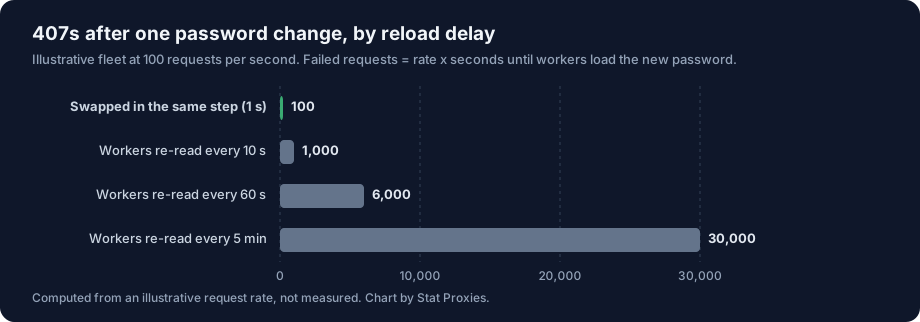
| Workers load the new password after | Failed requests at 100 per second |
|---|---|
| 1 second (same command writes the new list) | 100 |
| 10 seconds | 1,000 |
| 60 seconds | 6,000 |
| 5 minutes | 30,000 |
So don't change the password and let a timer pick it up. Change it, immediately fetch the list (which now carries the new password), and swap in the file your workers read with one atomic rename. Then have workers watch that file or treat a 407 as "re-read the list now". The script below does the first half; the second half lives in your workers. If you see 407s you can't explain, our 407 guide walks through the other causes.
Two limits apply. One password change per order per hour, shared with the dashboard. And a 502 from this endpoint means the change didn't go through, so the old password still works. Omit the body to get a generated 16-character password; setting your own needs the custom credentials feature.
What are the Stat API rate limits?
Every key gets 60 calls a minute across all endpoints, which is 3,600 an hour. Calls that change proxies, such as a password change, also count toward 10 a minute per key, and each order allows one password change per hour. A 429 response tells you how long to wait in retry_after_seconds.
| Limit | Allows |
|---|---|
| All calls, per API key | 60 a minute (3,600 an hour) |
| Calls that change proxies, per API key | 10 a minute |
| Password changes, per order | 1 an hour |
Reads are where the volume goes, and 60 a minute is plenty for a fleet that fetches its list on a timer or after a change. If you run separate workloads, give each its own order: each order then has its own password, its own hourly password budget and its own usage numbers. A 429 is a signal to wait, never to retry in a loop: honor retry_after_seconds, which is exactly what the script's call() helper does.
How do you read usage and cancel through the API?
GET /usage/{order_id} returns live usage for one order: megabytes and requests per hour (period=daily), per day of the week (weekly) or per day of the month (monthly, the default), plus totals and the top 100 domains by request count. Pass date=2026-10-21 for another window.
To cancel, call DELETE /delete/{subscription_id}/{product_type} with the product_type that /list shows for the order. The proxies keep working until the period ends, and POST /uncancel/... with the same two values reverses it until then.
Bandwidth is unlimited and billed per IP, so usage isn't a billing meter. It's for finding the job that suddenly sends ten times its usual requests to one domain, or checking that a retired workload really stopped.
A Python CLI for the Stat proxy API in 54 lines
This script wraps the calls above into six commands. It retries a 429 after the wait the API asks for, and every command that changes proxies rewrites proxies.txt atomically, so a worker never reads a half-written file or an old password.
You need Python 3.10 or newer and pip install httpx==0.28.1 (add httpx[socks] to test SOCKS5 lines). Set STAT_API_KEY. Optionally set STAT_PROTOCOL=socks5 and STAT_OS=windows, macos, ios or linux to change what proxies.txt contains.
# statctl.py: order, list, export, test and re-password Stat proxies from code.
# pip install httpx==0.28.1   export STAT_API_KEY=...   python statctl.py <command> ...
import asyncio, os, sys, time, httpx

API = os.environ.get("STAT_API", "https://dashboard.statproxies.com/api/v2/order")
api = httpx.Client(base_url=API, timeout=60, headers={"Authorization": f"Bearer {os.environ['STAT_API_KEY']}"})
OUT = "proxies.txt"  # your workers read proxies from this file
PROTO, OS_FLAG = os.environ.get("STAT_PROTOCOL", "http"), os.environ.get("STAT_OS")  # socks5; windows|macos|ios|linux

def call(method, path, **kw):
    for _ in range(3):
        r = api.request(method, path, **kw)
        if r.status_code != 429: break  # 429: rate limit or the hourly password limit
        wait = r.json().get("retry_after_seconds") or int(r.headers.get("retry-after", 60))
        print(f"429, waiting {wait}s"); time.sleep(min(wait, 900))
    if r.status_code >= 400: sys.exit(f"{method} {path}: HTTP {r.status_code} {r.text[:300]}")
    return r.json()

def save(order):  # atomic write: workers never read half a file
    q = {"format": "object", "protocol": PROTO, **({"fingerprint": OS_FLAG} if OS_FLAG else {})}
    proxies = call("GET", f"/fetch/{order}", params=q)["order"]["proxies"]
    lines = [f"{PROTO}://{p['username']}:{p['password']}@{p['ip']}:{p['port']}" for p in proxies]
    open(OUT + ".tmp", "w").write("\n".join(lines) + "\n"); os.replace(OUT + ".tmp", OUT)
    print(f"wrote {len(lines)} proxies to {OUT}")

async def test(url, target="https://api.ipify.org"):
    try:
        async with httpx.AsyncClient(proxy=url, timeout=15) as c:
            t = time.perf_counter(); r = await c.get(target)
            return f"{r.status_code} exit={r.text.strip()} {1000 * (time.perf_counter() - t):.0f} ms"
    except httpx.HTTPError as e:
        return f"FAIL {type(e).__name__}"

async def check():
    urls = [l.strip() for l in open(OUT) if l.strip()]
    for u, res in zip(urls, await asyncio.gather(*(test(u) for u in urls))):
        print(httpx.URL(u).host, res)

cmd, args = sys.argv[1], sys.argv[2:]
if cmd == "order":  # order <quantity> [customer]
    body = {"quantity": int(args[0]), "product_type": "isp", **({"customer": args[1]} if len(args) > 1 else {})}
    print(call("POST", "/newscale", json=body))
elif cmd == "list":
    for o in call("GET", "/list")["orders"]:
        print(o["order_id"], o["status"], o["quantity"], "IPs, renews/ends", time.ctime(o["unix_expiration_date"]))
elif cmd == "save":  # save <order_id>
    save(args[0])
elif cmd == "check":
    asyncio.run(check())
elif cmd == "password":  # password <order_id>: the old password gets 407 the moment this returns
    call("POST", f"/password/{args[0]}"); print("password changed"); save(args[0])
elif cmd == "usage":  # usage <order_id>
    u = call("GET", f"/usage/{args[0]}", params={"period": "daily"})
    print(u["usage"]["totals"]); [print(d["url"], d["requests"]) for d in u["top_domains"][:5]]
A typical session:
python statctl.py order 25 clientabc        # prints the order_id
python statctl.py save sub_example000000000000000
python statctl.py check                     # status, exit IP and time per proxy
python statctl.py password sub_example000000000000000
python statctl.py usage sub_example000000000000000
check fetches api.ipify.org through every proxy at once and prints the status, the exit IP and the time each took, so you can spot a dead line before your workers do. For a one-off test by hand, see how to test a proxy in curl.
We ran it on October 21, 2026 against a local server returning the documented response bodies and a local authenticated proxy. Every command worked; a 429 with retry_after_seconds made the helper wait and retry; and after a password change, proxies.txt carried the new password while a proxy still expecting the old one answered 407, which is the gap the atomic rewrite closes. We didn't run it against a live account, and STAT_API exists so you can point it at a mock first.
How does this compare with other providers' APIs?
Most proxy APIs cover a slice of the lifecycle. Bright Data's Account Management API has POST /zone/ips, which adds a count of static datacenter or ISP IPs to a zone and can pick their country; it's restricted to users with the Admin or Ops role. IPRoyal documents a reseller API for ISP proxies with an endpoint to change credentials on an order and one to check availability, the second gated to accounts with $10,000 or more in total spend. Check each provider's current docs before you build; these change.
Stat's angle is one key for the full order lifecycle on static US ISP IPs, at a flat price per IP. Where you need IPs outside the US or a choice of country, Bright Data's API does things ours can't.
When Stat is the wrong pick
- You need IPs outside the US, or a choice of state or city. We don't sell either.
- You want a new IP on every request. We don't sell rotating pools; every IP is static and stays yours.
- You want the proxy itself to authenticate by IP allowlist or token. The proxy connection uses a username and password only; the Bearer token is for the management API.
FAQ
Which proxy providers let you buy and manage IPs through an API?
Several, with different coverage. Bright Data's Account Management API can add static IPs to a zone, IPRoyal's reseller API can change credentials on an ISP order, and Stat Proxies' order API covers the whole lifecycle with one Bearer token: buy IPs, export them, change the password, read usage and cancel. Stat's static US ISP proxies are $2.50 per IP per month with unlimited bandwidth.
What happens to my proxies when I change the password through the API?
The new password is live before the call returns, and from that moment the old password gets 407 Proxy Authentication Required. Fetch the proxy list right after the change and swap it into your workers in the same step. You can change the password once per order per hour, and a 502 means nothing changed.
What are the Stat proxy API rate limits?
60 calls a minute per API key across all endpoints, which is 3,600 an hour, plus 10 a minute per key for calls that change proxies. Each order allows one password change an hour. A 429 response includes retry_after_seconds, so wait that long before retrying instead of looping. Separate workloads are easiest to manage as separate orders.
Can I get a SOCKS5 proxy list from the Stat API?
Yes. Add protocol=socks5 to GET /fetch/{order_id} or GET /list?include_proxies=true and you get the same IPs, username and password on the SOCKS5 port, which carries TCP and UDP. You can combine it with fingerprint=windows, macos, ios or linux, which adds an OS profile flag to the username in every line.
Sources
- Stat Proxies order API: endpoints, request and response bodies, feature gates and limits, checked against the API code on main on October 21, 2026.
- Stat Proxies product facts (price, minimum, protocols, OS profiles): ISP product page and pricing, checked October 21, 2026.
- Bright Data, Account Management API, "Add Static Datacenter/ISP IPs": docs.brightdata.com, checked October 21, 2026.
- IPRoyal, ISP proxies reseller API: docs.iproyal.com, checked October 21, 2026.
- ipify, public IP address API: ipify.org, checked October 21, 2026.
- httpx 0.28.1 behavior (a 407 from an HTTP proxy, SOCKS support via the
socksextra): tested locally, October 21, 2026.