How to Configure Stat Proxies with Kernel Browser (2026 Guide)
By Nicholas St. Germain. Published
Kernel runs Chromium in the cloud for agents. You call an API, you get a browser session back, and you drive it with Playwright over CDP, with computer use, or through WebDriver BiDi. Kernel ships managed proxies of its own, and it also lets you bring your own. A custom proxy in Kernel is just a saved configuration that gets attached to a browser session by ID.
This guide covers that second path. You point a Kernel custom proxy at a static ISP proxy from Stat, attach it to a session, and everything that session requests leaves from an IP that belongs to you for as long as you keep paying for it.
The configuration itself is four fields and a dropdown. Most of what follows is about the dropdown, and about proving the thing actually works.
Why bring your own proxy to Kernel
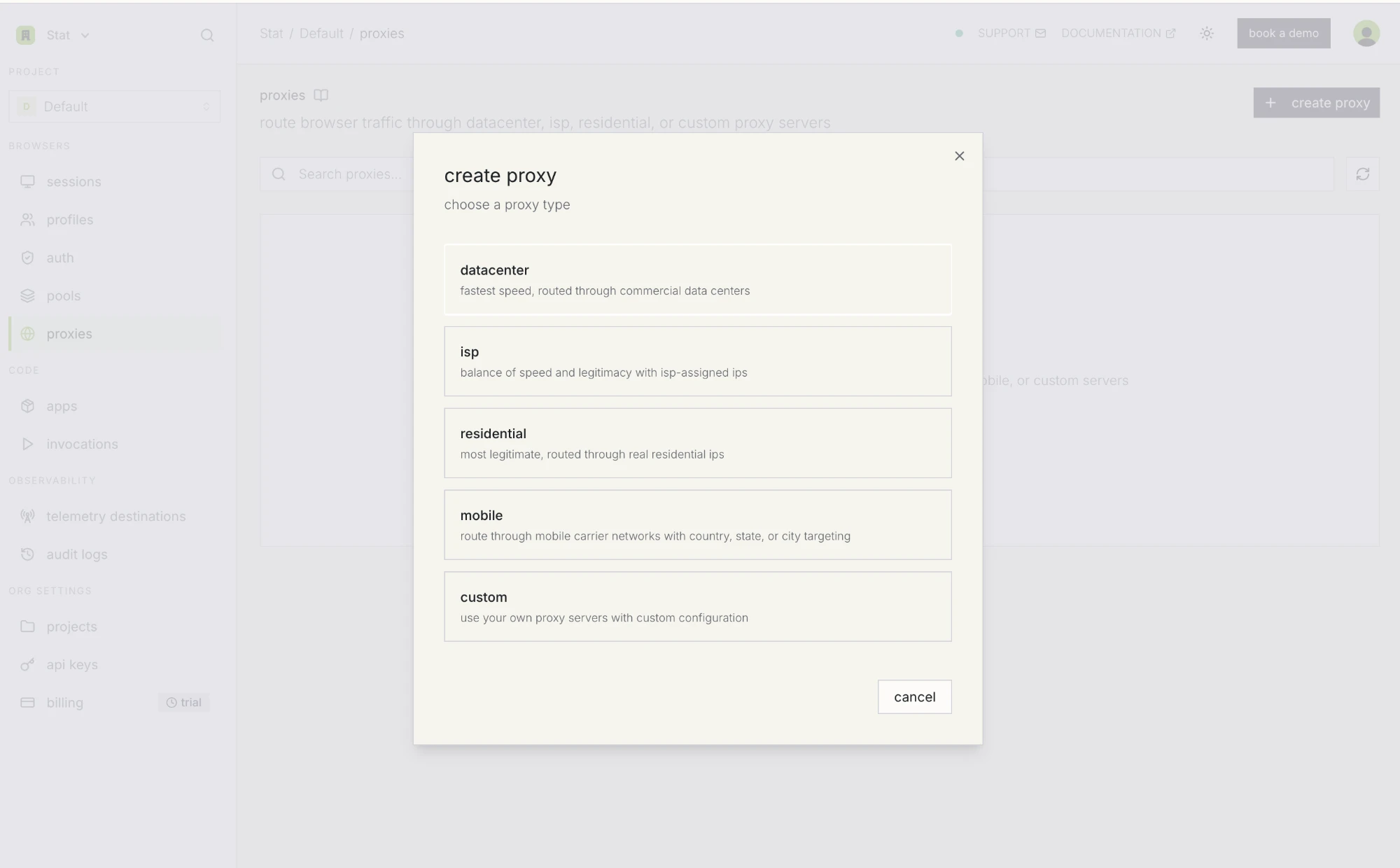
Kernel gives you five proxy types out of the box: datacenter, ISP, residential, mobile, and custom. The managed ISP option already hands you a static exit IP that survives between sessions, which covers a lot of use cases. Bringing your own is worth the extra setup in a handful of specific situations:
- You need the same IP in more than one place. If your stack spans Kernel, a local Playwright runner, and a Python worker hitting an API directly, a proxy you own is the only way all three exit from one address. A managed proxy only exists inside the platform managing it.
- Kernel's upstream blocks where you're going. Kernel's docs say plainly that certain destination categories (government, banking, payment domains) are blocked by its upstream network providers and will fail at the proxy layer, and they point to custom proxies as the workaround. If your workflow touches any of those, there's nothing to weigh up.
- Bandwidth math. Screenshot-heavy agent loops and vision models chew through data. Stat bills flat per IP per month with unmetered bandwidth, so ten thousand rendered pages cost what ten do.
- Swapping out a burned IP. Stat's management API replaces a single IP on an order and leaves the rest of it alone. It's available on plans with the proxy exchange capability enabled (ask support to turn it on for your organization) and doesn't apply to dedicated IP-range orders.
- Compliance. Some teams have to name the network their traffic leaves from and produce an invoice for it.
If none of that applies to you, Kernel's managed ISP proxy is one line of code and it works fine.
Before you start
- A Stat order with at least one proxy on it. Any ISP order will do. It speaks HTTP and HTTPS with username and password auth, on the port shown in your order's Connection panel line: 3120 on most orders, 3128 on older captcha orders.
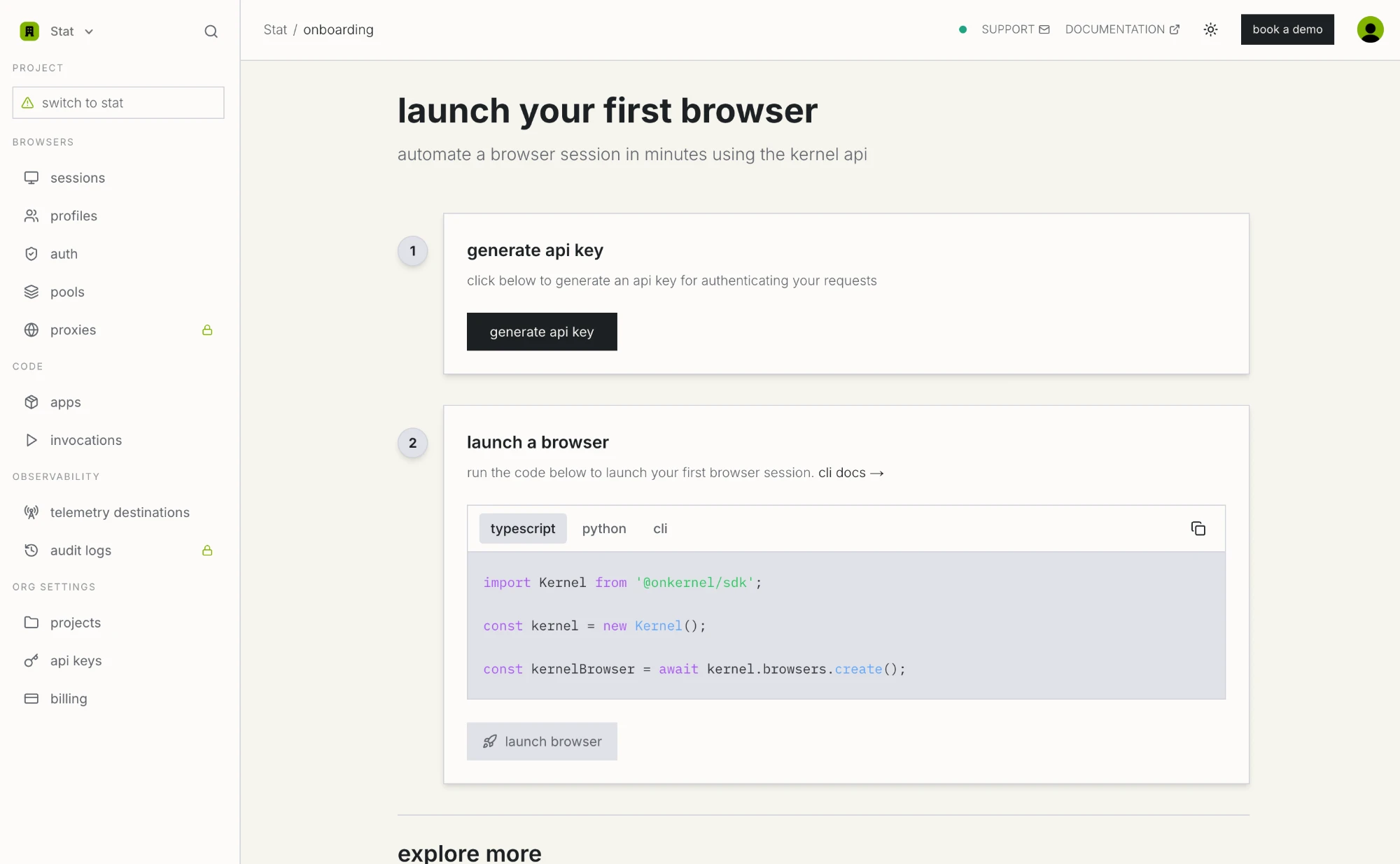
- A Kernel account and an API key. New accounts land on an onboarding screen with a generate api key button. The key also lives under org settings, api keys if you need it again later.
- The Kernel SDK, assuming you'd rather script this than click through the dashboard.
# Node
npm install @onkernel/sdk playwright

# Python
pip install kernel playwright
Both SDKs read KERNEL_API_KEY from the environment, so once that's exported, new Kernel() and Kernel() take no arguments.
Step 1: Grab your Stat credentials
Open your order in the Stat dashboard and find the Connection panel. Everything you need is in there: username, password, port, and your IP list in whichever format you pick from the dropdown.
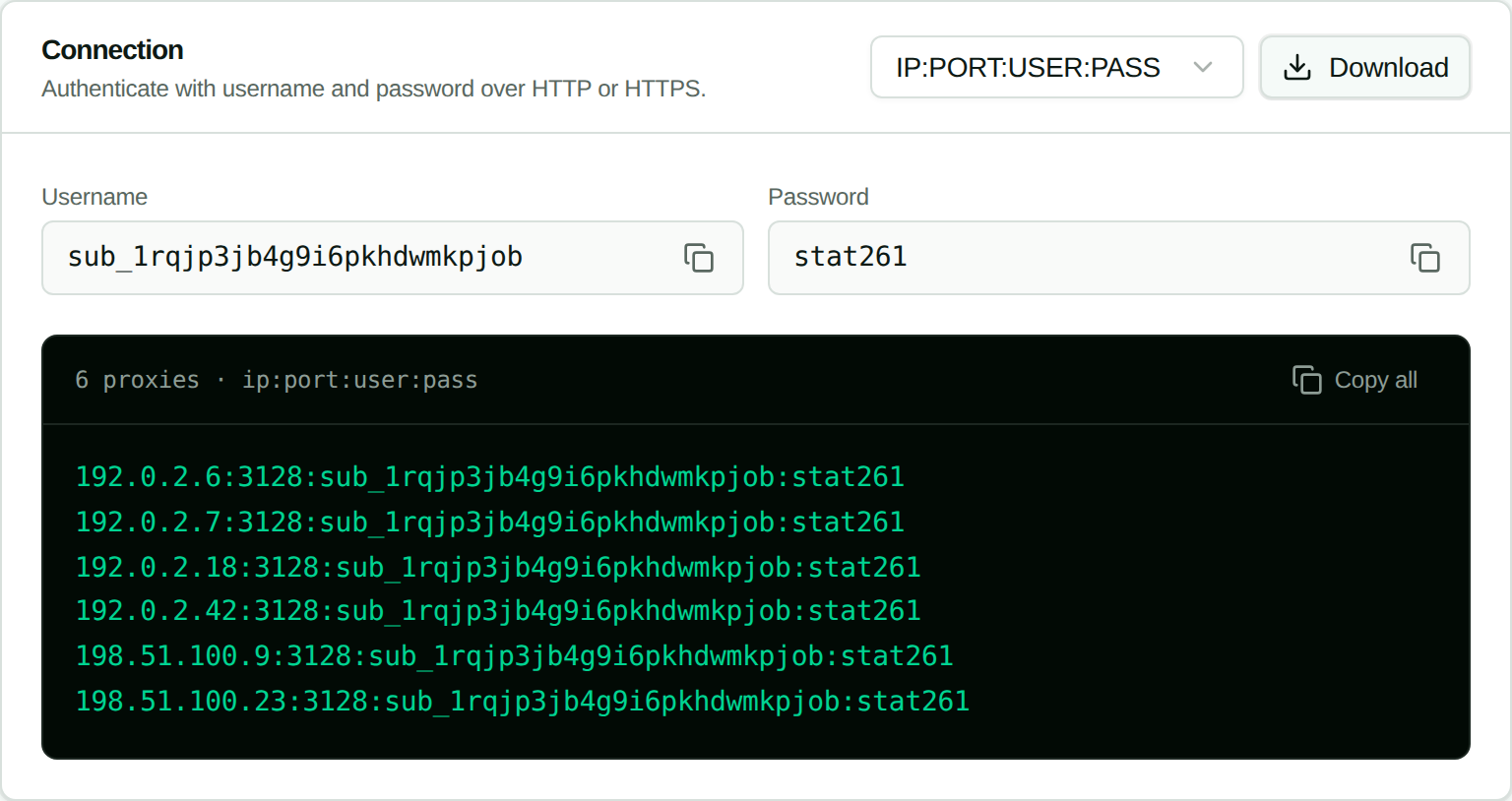
Two things that catch people out here:
- One credential pair covers every IP on the order. Ten proxies means ten hosts sharing a single username and password, not ten separate logins.
- The port isn't a fleet-wide constant. It's whatever the Connection panel's credential line shows for your plan: 3120 on most plans, 3128 on captcha plans.
Copy one line. That line is the entire configuration.
Step 2: Map that line onto Kernel's fields
Kernel's custom proxy config wants host, port, username, and password. A Stat credential line in IP:PORT:USER:PASS order is those four values, in that order, split on colons.
So 192.0.2.6:3120:sub_example000000000000000:statexamplepass breaks down as (this order is on a plan that uses port 3120; yours may show 3128 if it's a captcha plan):
| Segment | Kernel field |
|---|---|
192.0.2.6 |
config.host |
3120 |
config.port |
sub_example000000000000000 |
config.username |
statexamplepass |
config.password |
Which leaves one field that isn't in the credential line at all: protocol. This is the one that trips people up.
Kernel's protocol setting describes the hop between the Kernel browser and your proxy. It defaults to https, meaning Kernel will try to open a TLS connection to the proxy itself. Stat's endpoint, whether it's on 3120 or 3128, is a plain HTTP proxy endpoint, so you want http.
Nothing about your actual traffic gets weaker because of this. Requests to https:// sites are still tunnelled through the proxy with CONNECT and stay encrypted end to end between browser and destination. All protocol decides is whether the short hop from Kernel's browser VM to your proxy is itself wrapped in TLS.
Pick http and it works. Leave the https default in place and you get a handshake failure that reads, very unhelpfully, like the proxy is offline.
Step 3: Create the proxy in Kernel
Dashboard or code, your call. The dashboard is easier to follow the first time, and the code is what you'll actually ship, so both are below.
In the dashboard
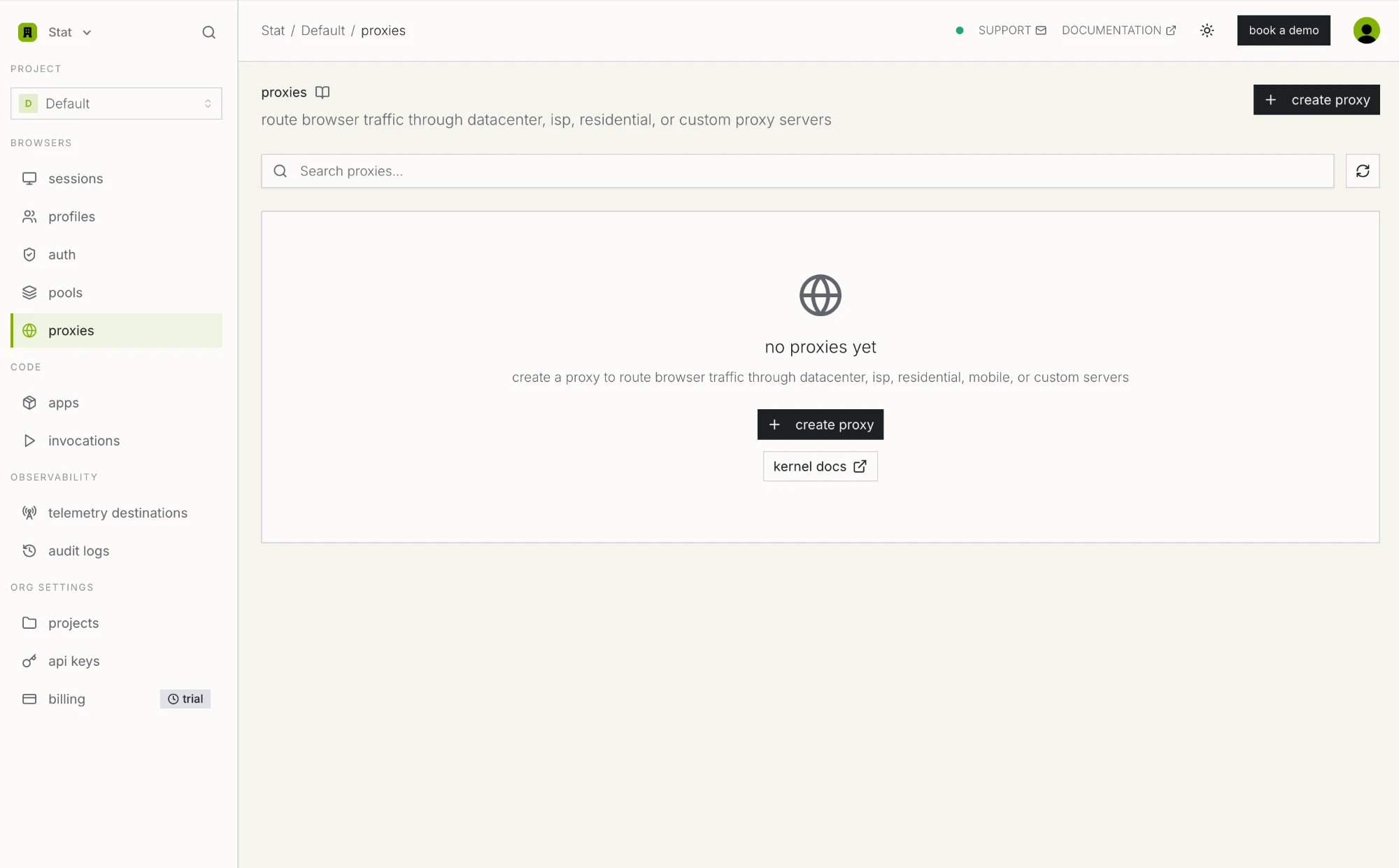
Open proxies in the left sidebar. On a fresh project it's empty apart from a create proxy button.
Kernel asks for the type first. The four managed types are at the top, and custom sits at the bottom of the list.
Then you get the form: four fields plus that protocol dropdown.
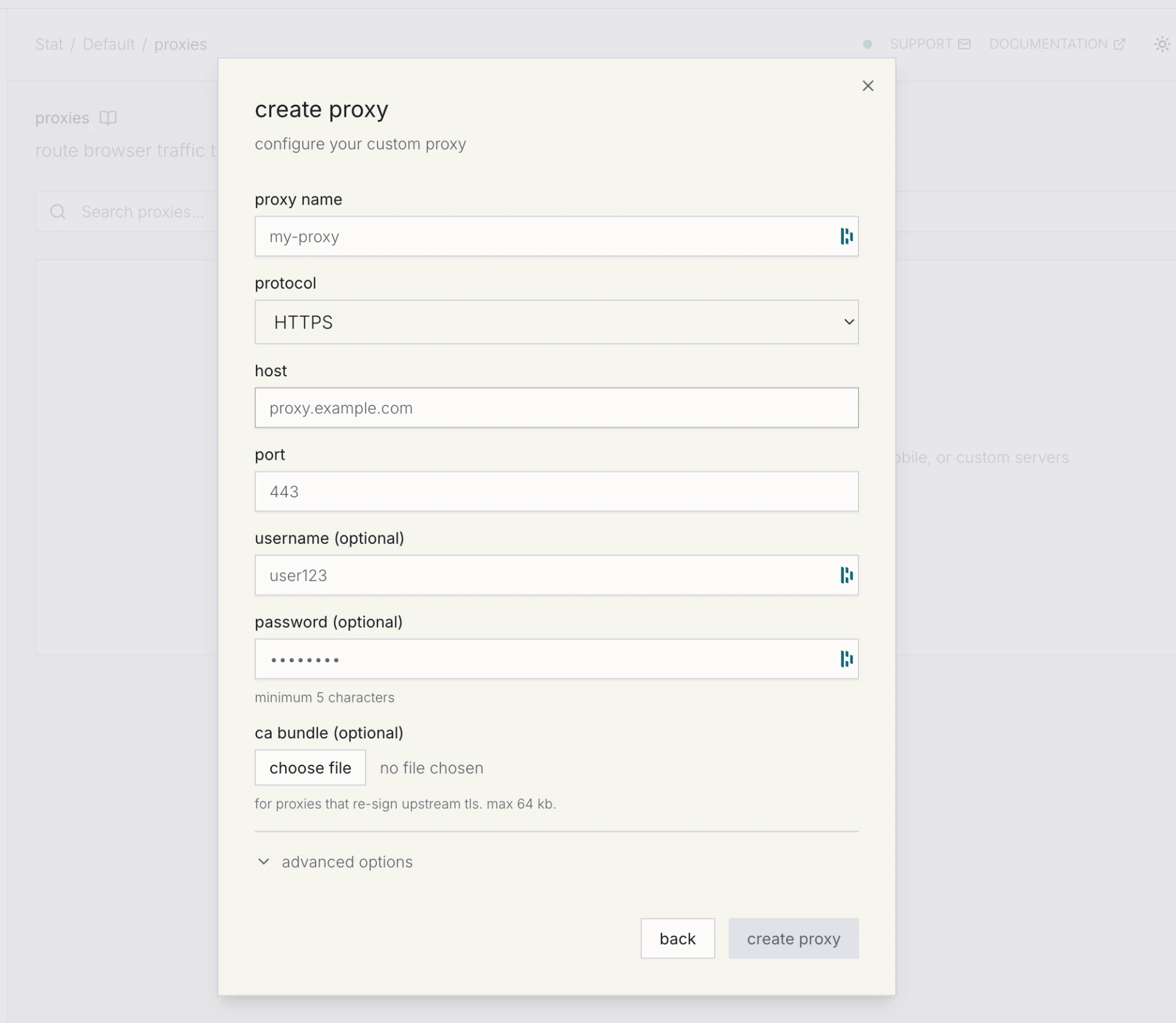
Fill it in like so:
| Field | Value | Notes |
|---|---|---|
| proxy name | stat-isp-agent-01 |
Free text. Name it after the agent that will use it rather than the IP. |
| protocol | HTTP |
Change this from the HTTPS default. See step 2. |
| host | 192.0.2.6 |
One IP from your Stat list. |
| port | 3120 |
From the Connection panel line, not a fixed value: 3120 on most plans, 3128 on captcha plans. |
| username | sub_example000000000000000 |
From the Connection panel. |
| password | statexamplepass |
From the Connection panel. Kernel wants 5 characters or more. |
| ca bundle | empty | Only for proxies that terminate and re-sign TLS. Stat does not, so skip it. |
Hit create proxy and Kernel hands back a proxy ID. That ID is what you attach to browser sessions.
In code
Same thing through the SDK, which is where you want to be the moment you have more than one IP. Set STAT_PROXY_IP, STAT_PROXY_PORT, STAT_PROXY_USER, and STAT_PROXY_PASS from your Connection panel line, then read them alongside KERNEL_API_KEY:
import Kernel from '@onkernel/sdk';

const kernel = new Kernel(); // reads KERNEL_API_KEY

const proxy = await kernel.proxies.create({
  type: 'custom',
  name: 'stat-isp-agent-01',
  protocol: 'http', // not the 'https' default: Stat's proxy is plain HTTP, whatever the port
  config: {
    host: process.env.STAT_PROXY_IP,       // 192.0.2.6
    port: Number(process.env.STAT_PROXY_PORT), // 3120 on most plans, 3128 on captcha
    username: process.env.STAT_PROXY_USER, // sub_example000000000000000
    password: process.env.STAT_PROXY_PASS,
  },
});

console.log(proxy.id, proxy.status);
import os
from kernel import Kernel

kernel = Kernel()  # reads KERNEL_API_KEY

proxy = kernel.proxies.create(
    type="custom",
    name="stat-isp-agent-01",
    protocol="http",
    config={
        "host": os.environ["STAT_PROXY_IP"],
        "port": int(os.environ["STAT_PROXY_PORT"]),  # 3120 on most plans, 3128 on captcha
        "username": os.environ["STAT_PROXY_USER"],
        "password": os.environ["STAT_PROXY_PASS"],
    },
)

print(proxy.id, proxy.status)
The password is write-only. Kernel's API gives you back has_password: true instead of the value, which becomes relevant when you rotate credentials later.
Run a health check before you attach it to anything. It validates credentials and connectivity, and it takes an optional URL so you can test the destination you care about:
await kernel.proxies.check(proxy.id, { url: 'https://ipinfo.io/json' });
With a static ISP proxy the exit IP doesn't move, so a green check against a real URL tells you something that stays true: the same session will reach the same target from the same address next week.
Step 4: Attach the proxy to a browser session
One parameter, proxy_id, when you create the browser:
import Kernel from '@onkernel/sdk';
import { chromium } from 'playwright';

const kernel = new Kernel();

const kernelBrowser = await kernel.browsers.create({
  proxy_id: proxy.id,
});

const browser = await chromium.connectOverCDP(kernelBrowser.cdp_ws_url);
const context = browser.contexts()[0];
const page = context.pages()[0];

await page.goto('https://ipinfo.io/json');
console.log(await page.evaluate(() => document.body.innerText));

await browser.close();
import asyncio
from kernel import Kernel
from playwright.async_api import async_playwright

kernel = Kernel()

async def main():
    kernel_browser = kernel.browsers.create(proxy_id=proxy.id)

    async with async_playwright() as pw:
        browser = await pw.chromium.connect_over_cdp(kernel_browser.cdp_ws_url)
        context = browser.contexts[0]
        page = context.pages[0]

        await page.goto("https://ipinfo.io/json")
        print(await page.evaluate("document.body.innerText"))

        await browser.close()

asyncio.run(main())
Your Playwright code stays exactly as it was. No launch flags, no http_credentials, no proxy-auth extension. Kernel runs an Envoy sidecar alongside Chromium in the browser VM and forwards through your proxy from there, which is also why the usual Playwright proxy authentication headaches never show up.
A couple of behaviours to keep in mind:
- Stealth browsers get a managed proxy by default. Want anti-detection and your own IP? Pass both.
{ stealth: true, proxy_id: proxy.id }keeps Kernel's anti-detection setup while routing through you. Thedisable_default_proxyflag is for stealth browsers running with no proxy at all, and you can't combine it withproxy_id. - You can hot-swap the proxy on a live session.
kernel.browsers.update(sessionId, { proxy_id: otherProxy.id })takes roughly two to three seconds, and passing an empty string routes the session direct. The network drops briefly mid-swap, so anything in flight can fail.
Step 5: Verify it end to end
Check both sides. The browser tells you what the destination sees; your Stat dashboard tells you the traffic really went through your IP instead of around it.
From inside the session, the ipinfo.io response should show your Stat IP with a residential ISP as the org, not a cloud provider:
{
  "ip": "192.0.2.6",
  "city": "Ashburn",
  "region": "Virginia",
  "country": "US",
  "org": "AS64500 Example Broadband"
}
If ip shows anything other than the host you configured, the proxy isn't attached. Go back and check that proxy_id actually made it into browsers.create, rather than being created and then left sitting there.
From the Stat side, open the order and look at the Usage panel. Requests and bandwidth should climb while your agent runs.
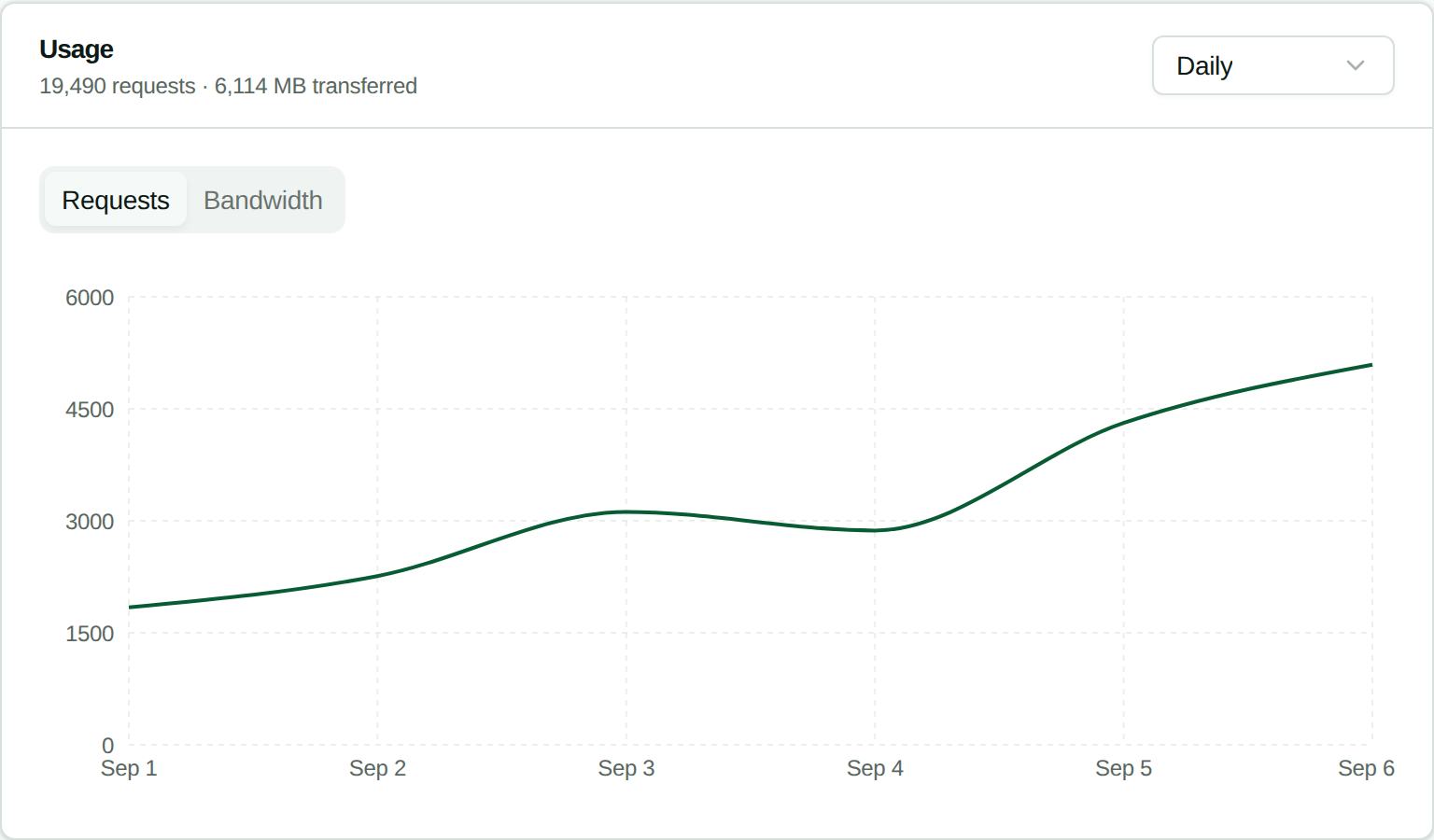
Top domains is the more useful of the two panels, because it shows you what went through the proxy. A browser agent renders whole pages, so expect to see the target site plus its CDN and asset hosts, not a single API domain sitting there on its own:
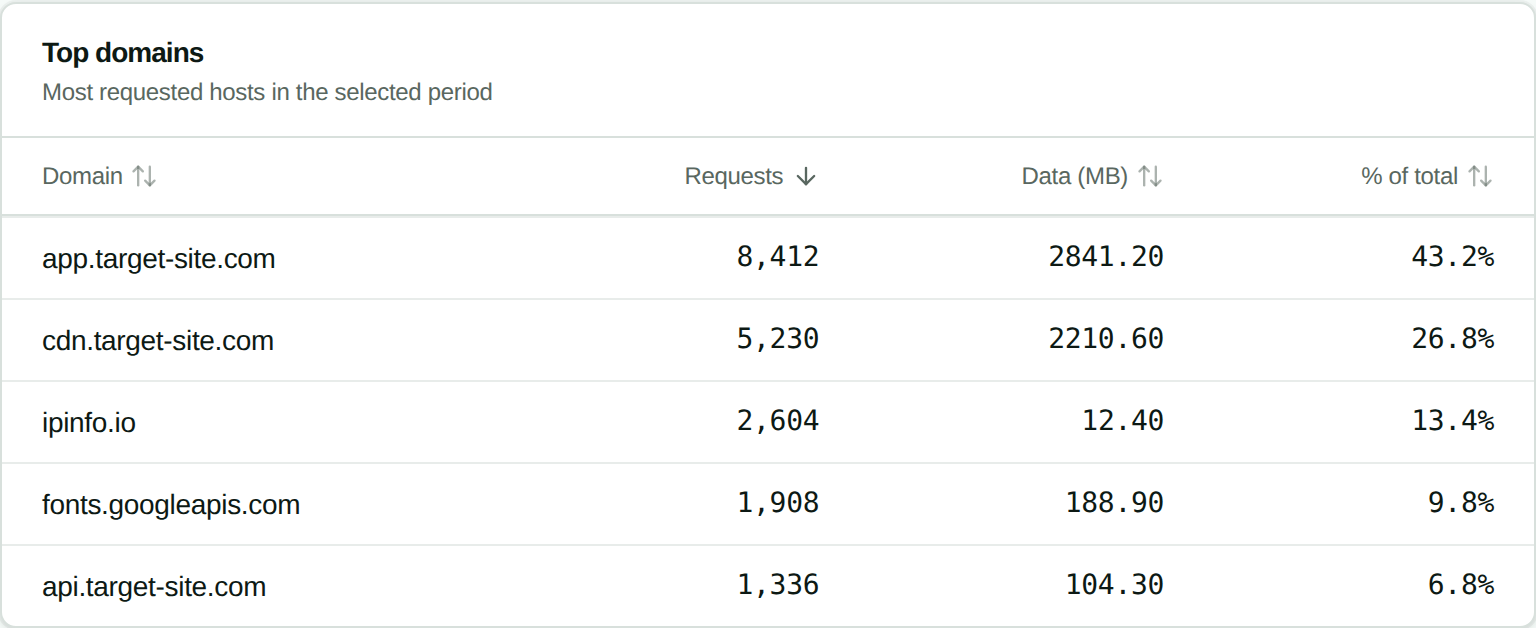
If the target site shows up but its CDN doesn't, something is routing around the proxy. Start with your bypass host rules.
Running one IP per agent
The whole reason to use static ISP proxies with browser agents is that a long, logged-in, multi-step run holds one identity from first click to last. In practice that means one Stat IP per concurrent agent, and one Kernel proxy configuration per IP.
const STAT_IPS = ['192.0.2.6', '192.0.2.7', '192.0.2.18', '192.0.2.42'];

// Create once at startup, store the IDs, reuse them forever.
const proxies = await Promise.all(
  STAT_IPS.map((host, i) =>
    kernel.proxies.create({
      type: 'custom',
      name: `stat-isp-agent-${String(i + 1).padStart(2, '0')}`,
      protocol: 'http',
      config: {
        host,
        port: Number(process.env.STAT_PROXY_PORT), // 3120 on most plans, 3128 on captcha
        username: process.env.STAT_PROXY_USER,
        password: process.env.STAT_PROXY_PASS,
      },
    }),
  ),
);

// Then pin each agent to its own proxy for the life of the workflow.
const browser = await kernel.browsers.create({ proxy_id: proxies[agentIndex].id });
Create these once and hang on to the IDs. Kernel garbage-collects proxy configurations that have sat unused for 14 days, but only once an organization has more than 100 of them, and anything attached to a session, pool, or managed auth connection is kept regardless.
One thing to watch if you use browser pools for instant browser acquisition: a hot-swapped proxy reverts to the pool's default as soon as the browser is released.
Bypass hosts
Kernel can route specific hostnames around the proxy and out through its own direct egress. That's worth setting up for anything that has no reason to carry your IP identity:
const proxy = await kernel.proxies.create({
  type: 'custom',
  name: 'stat-isp-agent-01',
  protocol: 'http',
  config: { host, port, username, password },
  bypass_hosts: ['localhost', '*.internal.example.com'],
});
Exact hostnames and wildcard subdomains work, up to 100 entries. Ports, paths, schemes, and bare IP addresses do not. Stay conservative with this list. Sending a site's assets direct while its HTML goes through the proxy is precisely the kind of split that fingerprinting picks up on.
Replacing a burned IP
When an IP starts collecting challenges, swap it at the source instead of rebuilding your setup. Stat's API replaces one IP on an order and leaves the username, password, port, and every other IP untouched:
curl -X POST "https://dashboard.statproxies.com/api/v2/order/replace/{order_id}" \
  -H "Authorization: Bearer {your_api_key}" \
  -H "Content-Type: application/json" \
  -d '{"ip": "192.0.2.6"}'
{
  "response": "success",
  "details": {
    "old_ip": "192.0.2.6",
    "new_ip": "192.0.2.42",
    "new_proxy": "192.0.2.42:3120:sub_example000000000000000:statexamplepass"
  }
}
Then sort out the Kernel side. Kernel's proxy update call is documented for renaming, so treat host, port, and credentials on an existing configuration as fixed. Create a new custom proxy with the new host, point your agent at the new ID, then delete the old configuration once nothing references it. Do the delete last: removing a proxy immediately reconfigures any browser still attached to it to route direct.
Replacements are rate limited to one IP per order every 60 seconds. Full endpoint reference lives in the order API documentation.
Troubleshooting
407 Proxy Authentication Required
Wrong username or password, or the password was rotated in the Stat dashboard after you set up the Kernel configuration. Since Kernel stores the password write-only, you can't see what it has, so create a fresh proxy configuration with the current credentials and switch to it. Our 407 troubleshooting guide covers the other causes.
Handshake or connection errors that look like the proxy is down
Usually this is protocol left on the https default against Stat's plain HTTP endpoint. Set it to http and try again. Kernel's proxy health check surfaces this in seconds, which is the argument for running it before you attach the proxy to anything.
Health check fails but the credentials look right
Check the port before anything else. Pasting 3128 into config.port when your plan's Connection panel line actually shows 3120 (or the reverse, on a captcha plan) is the single most common cause of a failed Kernel health check. Copy the port straight from the credential line rather than assuming it.
The session shows a datacenter IP
Either proxy_id never made it into browsers.create, or you're on a stealth browser still using Kernel's default managed proxy. Pass proxy_id explicitly, and remember that disable_default_proxy and proxy_id are mutually exclusive.
One specific site fails while everything else works
Check whether that host matches a bypass_hosts entry, keeping in mind that wildcards only match subdomains. If the site is a bank, a payment processor, or a government domain, this is the case where a custom proxy is the fix rather than the problem, since Kernel's managed pools block those categories upstream.
It works in cURL but not in Kernel
Kernel connects to your proxy from its own cloud infrastructure, not from your laptop. Stat proxies authenticate on username and password from any source IP, so there's no allowlist to update, but do confirm you tested the same IP with the same credentials. Our cURL proxy testing guide is a good starting point.
The proxy works but pages still get blocked
Then you have a fingerprinting problem rather than an IP problem. Turn on Kernel's stealth mode alongside your proxy_id, and read why AI agents get blocked by Cloudflare for what else these checks look at.
Stat IPs also speak SOCKS5 with the same login, but use HTTP for Kernel, because that is what Kernel's custom proxy takes.
What Stat doesn't do
Worth saying out loud so you don't design around features that aren't there:
- No rotation. Stat IPs are static and dedicated. That is the point of pairing them with agent sessions, but if you need a fresh IP per request, use Kernel's managed residential or mobile pools.
- No IP allowlist or token auth on the proxy connection. Username and password only. The Bearer token API manages orders and IPs; it doesn't authenticate proxy traffic.
- US locations. Non-US exit geography is a job for a Kernel managed proxy.
FAQ
Does Kernel support username and password proxy authentication?
Yes. A custom proxy configuration takes username and password alongside host and port, and Kernel's Envoy sidecar handles the Proxy-Authorization header on the browser's behalf. Your Playwright code does no credential handling of its own.
Should protocol be http or https for Stat Proxies?
Use http. Kernel's protocol field describes the connection between the Kernel browser and your proxy, and it defaults to https, which expects TLS on that hop. Stat's endpoint, on 3120 or 3128 depending on your plan, is a plain HTTP proxy. Traffic to https:// destinations is still tunnelled with CONNECT and stays encrypted end to end either way.
Do I need a separate Kernel proxy configuration for every Stat IP?
Yes. A Kernel custom proxy points at one host and port, so ten Stat IPs means ten configurations. They all share the same username and password, so it's a short loop at startup. Create them once, store the IDs, reuse them.
Can I change the IP on an existing Kernel custom proxy?
Treat host, port, and credentials as fixed once created; Kernel's proxy update call is documented for renaming a configuration. To move to a new IP, create a new custom proxy, point your sessions at the new ID, then delete the old one. Delete it last, because deleting a proxy immediately routes any attached browser direct.
Will the same IP be used across multiple Kernel sessions?
Yes. Stat ISP proxies are static and dedicated, so every Kernel session attached to that proxy configuration exits from the same address today and next month. That persistence is exactly why they suit logged-in agent workflows.
Is bandwidth metered?
No. Stat bills flat per IP per month with unlimited bandwidth, which suits screenshot-heavy and vision-model agent loops where per-GB pricing gets expensive quickly. Our flat rate versus per GB breakeven math works through where the crossover lands.
Do I still need Kernel's stealth mode with a custom proxy?
Usually, yes. A clean residential IP fixes IP reputation. It does nothing for browser fingerprinting, TLS fingerprinting, or behavioural checks. Passing stealth: true alongside proxy_id keeps Kernel's anti-detection setup while routing through your IP.
What is the CA bundle field for?
Only for proxies that terminate and re-sign upstream TLS, which is common with corporate inspection proxies. Stat doesn't intercept TLS, so leave it empty. If you do need it, the bundle has to be supplied when the browser is created and cannot be hot-swapped onto a running session.
Summary
Configuring Stat with Kernel comes down to four fields plus the one dropdown that catches everyone:
- Copy a single
IP:PORT:USER:PASSline from the Connection panel in the Stat dashboard. - Create a Kernel custom proxy from it, with protocol set to http rather than the https default.
- Run
kernel.proxies.checkbefore you trust it. - Pass
proxy_idtokernel.browsers.createand drive the session with Playwright the way you always would. - Verify from both ends: the exit IP inside the session, and the usage and top domains panels on the Stat side.
One IP per concurrent agent, created at startup and reused, is the setup that holds up over long logged-in runs. Still choosing a cloud browser? Our cloud browser benchmark puts Kernel up against Browserbase, Hyperbrowser, and Steel on session create and connect latency, and there's a matching walkthrough for proxies in Browserbase.
Need the IPs? Stat ISP plans start at $2.50 per proxy per month with unlimited bandwidth, US Tier 1 ISP addresses, and an API for adding capacity or replacing a burned IP mid-run.