Which ISP proxies are best for sneaker bots?
By Nicholas St. Germain. Published
The best ISP proxies for sneaker bots are dedicated static IPs that no other botter shares, located close to the server your bot runs on, with one IP per checkout task. For US releases on Nike, Shopify stores and Footsites, Stat Proxies Events or ISP proxies at $2.50 per IP fit that description. For a single release day, IPRoyal's 24-hour static rentals at $1.80 per IP cost less. For EU and UK drops, buy from a provider with IPs in those countries, such as Decodo, IPRoyal or Rayobyte.
Disclosure: Stat Proxies wrote this, and we sell ISP proxies. I started in proxies as a sneaker botter in 2017 and built my own because buying them got expensive, so the advice below is what I would tell a friend running tasks this weekend. Competitor prices come from each provider's own pricing page. Prices checked October 2026.
Quick answer: sneaker proxy options compared
| Provider | IP type | Pricing model | Starting price | Bandwidth | Best for |
|---|---|---|---|---|---|
| Stat Proxies Events | Dedicated static residential, US | Flat per IP per month | $2.50/IP (10 IP minimum) | Unlimited | US drops where latency matters |
| Stat Proxies ISP | Dedicated static ISP, US | Flat per IP per month | $2.50/IP (25 IP minimum) | Unlimited | Running US accounts and tasks all month |
| IPRoyal | Dedicated static residential | Per IP, by rental length | $1.80/IP for 24 hours; $2.70/IP for 30 days | Unlimited | One release day, 31+ countries |
| Decodo | Dedicated ISP | Per IP per month | $3.33/IP at 3 IPs | Unlimited threads and sessions | Small EU or US task groups |
| Rayobyte | Dedicated ISP | Per IP per month | $5/IP (5 to 99 IPs) | Not metered, fair usage | US, UK and EU drops, whitelist auth |
| Bright Data | Dedicated or shared ISP | Per IP per month | Dedicated $3.50/IP at 10 IPs | 100 GB fair usage per IP | Teams already on Bright Data |
| Oxylabs | ISP, shared with up to 3 users | Per IP per month | $1.60/IP at 10 IPs | Unlimited with fair usage | Monitors, not checkout tasks |
What release-day traffic does to a proxy
On a release, every bot hits the same product page, the same add-to-cart endpoint and the same queue in the same few seconds, and the site's anti-bot layer scores each connection on arrival. Three properties of the proxy decide whether your task survives that scoring.
Ban resistance comes from the IP's history
Sneaker sites block datacenter ASNs at the door, which is why everyone moved to ISP and residential IPs years ago. Among ISP IPs, the difference is who used the address before you. A dedicated IP has only your history on it. An IP shared with other customers, like Oxylabs' ISP plans that list "shared with up to 3 users", can arrive at a release already flagged by someone else's bot. For monitors that only read product pages, shared IPs are fine. For checkout tasks, pay for dedicated.
Ask any provider how they handle a flagged IP. Ours get replaced free within 24 hours of a report, and Rayobyte lets you swap single IPs from its dashboard. Replace burned IPs the week before a drop, since a replacement can take up to a day.
Latency is mostly about where your bot runs
Your request travels from the bot to the proxy, then from the proxy to the site's edge. The second hop is usually short, because big retailers sit behind CDNs with edges in every US metro. The first hop is the one you control. If your bot runs on a server in Virginia and your proxies exit in Virginia, that hop is a few milliseconds. If your bot runs on a laptop in California against East Coast proxies, you add a cross-country round trip to every request.
Our Events proxies list a 10 to 50 ms latency range, with locations in California, New Jersey and Virginia. Put your bot server in the same region as your proxies. We did not benchmark competitors for this post, so we make no latency claims about them.
Sticky sessions decide whether a checkout finishes
When your task adds to cart, the site ties that cart and its anti-bot cookies to the IP that created them. If the next request arrives from a different IP, the site can treat it as a hijacked session. Static ISP IPs never change, so the session holds for as long as the task runs.
Rotating residential proxies offer "sticky" sessions instead, with time limits. SOAX lists sticky mobile sessions of up to 60 minutes, and IPRoyal residential lists sticky sessions of up to 7 days. Those work for draw entries across many accounts. For a live checkout, a static IP removes the timer.
Cost per working IP
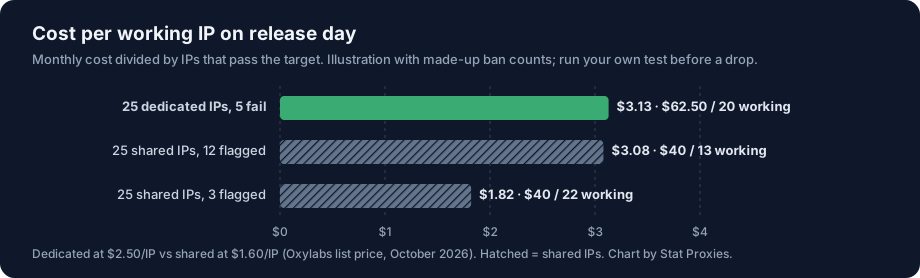
The sticker price per IP is the wrong number. What you pay for is IPs that pass the target on release day:
cost per working IP = monthly cost / IPs that pass the target on release day
An illustration with made-up ban counts: 25 dedicated IPs at $2.50 is $62.50. If 5 of them fail a test against the target and you cannot replace them in time, you have 20 working IPs at $3.13 each. Twenty-five shared IPs at $1.60 is $40, and if 12 of them arrive flagged by other users, your 13 working IPs cost $3.08 each, with less room to run tasks. If only 3 arrive flagged, the shared IPs cost $1.82 per working IP and win. Run your own version of this with a test the week before a drop. The number changes a lot by site.
For sizing, use one IP per concurrent checkout task plus spares. Our how many proxies do I need post works through 15 tasks at 20 IPs, roughly 30 percent spare to cover bans during the drop.
Providers, one by one
Stat Proxies
Events proxies are $2.50 per IP per month with a 10 IP minimum, true residential IPs in California, New Jersey and Virginia, unlimited bandwidth and a 30-day duration. ISP proxies are $2.50 per IP with a 25 IP minimum, on residential ASNs from major US Tier-1 carriers, and never rotate. Both support HTTP, HTTPS and SOCKS5 with unlimited concurrent connections, and both use username and password auth.
Where we are the wrong pick: we have no IPs outside the US, so EU and UK Footsites or regional Nike releases need someone else. We have no 24-hour rentals; the shortest term is a month. There is no free trial, only a 24-hour satisfaction guarantee for new customers. See the sneaker bots use case for setup notes.
IPRoyal
IPRoyal rents dedicated static residential IPs for 24 hours at $1.80 per IP, 30 days at $2.70 or 90 days at $2.40, with unlimited traffic and 31+ countries. If you only run one release a month, 25 IPs for 24 hours costs $45 against $62.50 for a month of ours. That is the honest pick for occasional botters, and for anyone who needs non-US countries.
Decodo
Decodo's dedicated ISP IPs start at 3 IPs for $9.99 and fall to $2.50 per IP at 200, with unlimited threads and a 14-day money-back guarantee. Its locations include the US, the UK, Germany and France. The small 3 IP plan is useful for testing one site before buying a full task group. Avoid Decodo's shared ISP plans, priced from $0.27 per IP, for checkout tasks.
Rayobyte
Rayobyte's dedicated ISP IPs cost $5 per IP for 5 to 99 IPs, in the US, UK, Canada, Germany, France and Italy, with unmetered traffic and IP whitelisting. It is double our per-IP price, and it covers the European sites we cannot.
Bright Data
Bright Data sells dedicated ISP IPs from $3.50 each at 10 IPs, falling to $2.50 at 1,000, with a 100 GB fair-usage allowance per IP per month. Sneaker tasks move little data, so the allowance rarely matters here. For a 10 to 25 IP task group, compare the $3.50 per-IP price.
Oxylabs
Oxylabs' ISP proxies are $1.60 per IP at 10 IPs, across 25 countries, shared with up to 3 users. Use them for restock monitors and product-page polling. Keep checkout tasks on dedicated IPs.
What proxies cannot fix
The hardest releases profile your browser fingerprint, TLS handshake and mouse behavior well past the IP. A clean dedicated IP feeding a detectable bot still fails. If a bot fails on every proxy you try, look at the bot before you buy more IPs. Our post on why proxies get slow or blocked covers the non-IP causes.
How we compared
- Dedicated or shared. Shared IPs carry other botters' history into your release.
- Session stability. Static IPs versus sticky sessions with a time limit.
- Location. US-only versus the countries where EU and UK drops happen.
- Entry cost. Smallest order and shortest term, read from each pricing page.
We did not run release-day tests or latency benchmarks on competitors, and we did not include checkout success rates, because no provider publishes them in a form you can check. Prices are list prices without promo codes, checked October 2026.
FAQ
What are the best proxies for sneaker bots?
Dedicated static ISP or residential IPs that no one else uses, near your bot server, one per checkout task. For US releases, Stat Proxies Events or ISP proxies at $2.50 per IP. For one drop day, IPRoyal's 24-hour static IPs at $1.80 each. For EU and UK releases, Decodo, IPRoyal or Rayobyte.
Which ISP proxies handle heavy sneaker bot traffic without frequent bans?
Dedicated ISP IPs with unlimited concurrent connections and a fast replacement policy. Shared ISP IPs, such as Oxylabs' plans shared with up to 3 users, can arrive flagged by another customer's bot. Test each IP against the target the week before a drop and replace the ones that fail.
How many proxies do I need for a sneaker bot?
One IP per concurrent checkout task plus about 30 percent spare for bans. Fifteen tasks means about 20 IPs. Two tasks on one IP tend to get flagged together.
Are residential or ISP proxies better for sneakers?
ISP proxies are better for live checkout, because the IP never changes mid-session. Rotating residential proxies with sticky sessions suit draw entries across many accounts, where you want many different IPs and sessions are short.
Do I need unlimited bandwidth for sneaker proxies?
Rarely. Sneaker tasks move little data, so a per-IP allowance like Bright Data's 100 GB rarely runs out. Unlimited bandwidth matters more for monitors that poll pages all day.
Does proxy location affect sneaker bot speed?
Yes. Run your bot on a server in the same region as your proxies. Stat Proxies Events IPs are in California, New Jersey and Virginia, so a bot hosted near one of those cuts the bot-to-proxy hop to a few milliseconds.